AI Vlog Video Maker Review: Automated AI Vlogging Without Filming
Building vlog content usually breaks at the same point: recording footage, managing locations, and spending hours in editing tools. AI Vlog Video Maker steps into that gap by converting written ideas or images into short, narrative-driven vlog videos. You describe the concept, choose the style, and the system generates a complete clip with motion and sound in one flow.
Below is a practical review written for creators, marketers, and teams deciding whether this tool belongs in their short-form video stack.
Quick Summary
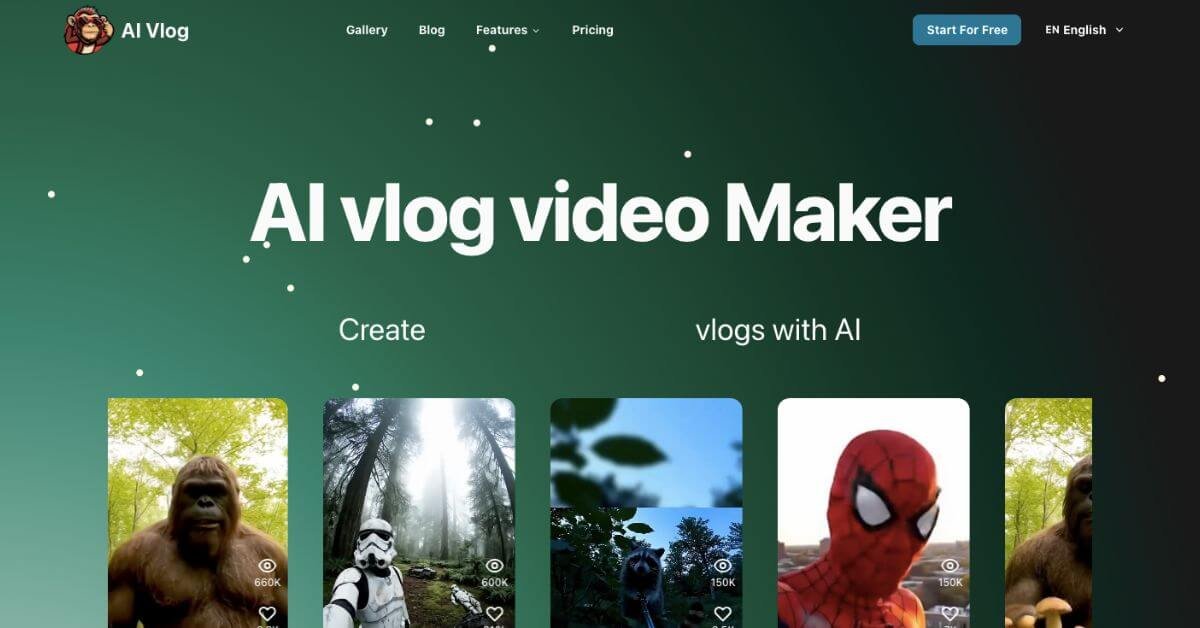
AI Vlog Video Maker is an AI-driven video creation tool that turns text ideas and images into short, vlog-style videos using Google Veo 3. It focuses on character-based, narrative visuals that look and feel like real vlogs without filming or manual editing.
Is it worth using? Yes, if you want fast, automated vlog content for Shorts, Reels, or experiments without cameras or editing timelines.
Who should use it? Short-form creators, social media managers, meme and character vlog creators, and marketers testing visual concepts quickly.
Who should avoid it? Creators who need long-form videos, frame-level control, or advanced post-production workflows.
Verdict Summary
Best for
Creators publishing Shorts, Reels, and TikTok-style videos
Marketers testing character-based or themed video concepts
Founders and indie teams producing visual content without cameras
Not for
Long-form YouTube vloggers
Editors who need timeline-level control
Studios producing cinematic or branded productions
Rating
G2: Not listed yet
Editor rating: 4.3/5 based on output quality, ease of use, and pricing value
What Is AI Vlog Video Maker?
AI Vlog Video Maker is a web-based AI video generator designed specifically for vlog-style content. Instead of stitching clips or animating scenes manually, users provide a text description or images and let the platform generate a short video that follows a continuous narrative.
The system uses Google Veo 3 to produce realistic motion, character behavior, and ambient sound. The result is a clip that feels like a casual vlog rather than a slideshow or stock animation. It is commonly used for AI character vlogs, animal-style vlogs, parody content, and experimental storytelling.
How AI Vlog Video Maker Works
Add 1 to 3 images or start with text only
Describe the vlog idea, character, and setting
Select style and generation settings
Generate an AI-powered video clip with motion and sound
Download or refine externally in tools like CapCut
The process is linear and does not require editing experience.
Key Features
AI vlog generation powered by Google Veo 3
Text-to-video and image-to-video workflows
Short, narrative-based video output
Built-in sound effects
Commercial usage rights on paid plans
Fast processing optimized for social media formats
AI Vlog Video Maker uses a credit-based subscription model.
Lite: $8 per month billed annually
30 credits
3 video generations
Pro: $15 per month billed annually
100 credits
10 video generations
Max: $100 per month billed annually
600 credits
60 video generations
All paid plans include Google Veo 3 support, sound effects, fast processing, and commercial usage rights. There is no fully free plan, but users can explore sample outputs before subscribing.
Best Alternatives & Comparisons
Runway: Better for cinematic and longer AI video generation
Pika Labs: Strong creative styles and motion control
Synthesia: Better for presenter-led and corporate videos
AI Vlog Video Maker stands out for short, vlog-style storytelling rather than polished brand videos.
Frequently Asked Questions (FAQ)
What makes AI Vlog Video Maker different from other AI video tools?
It focuses on vlog-style narratives with continuous motion rather than slide-based or avatar-only videos.
Can I use the videos for commercial projects?
Yes. All paid plans include commercial usage rights.
How long are the generated videos?
Videos are short, typically up to 8 seconds, designed for Shorts and Reels.
Does it support image-to-video generation?
Yes. Users can upload 1 to 3 images and generate a vlog-style clip from them.
Is editing required after generation?
No. The output is ready to publish, though some creators refine clips in external editors.
Final Recommendation
AI Vlog Video Maker works best as a rapid content engine for short-form platforms. It is not a replacement for professional editing software, but it removes the biggest friction in vlog creation: filming and initial production. If your workflow values speed, experimentation, and character-driven visuals, it earns a spot in your toolkit.