VisualGPT Review: Practical AI Visual Creation for Non-Designers
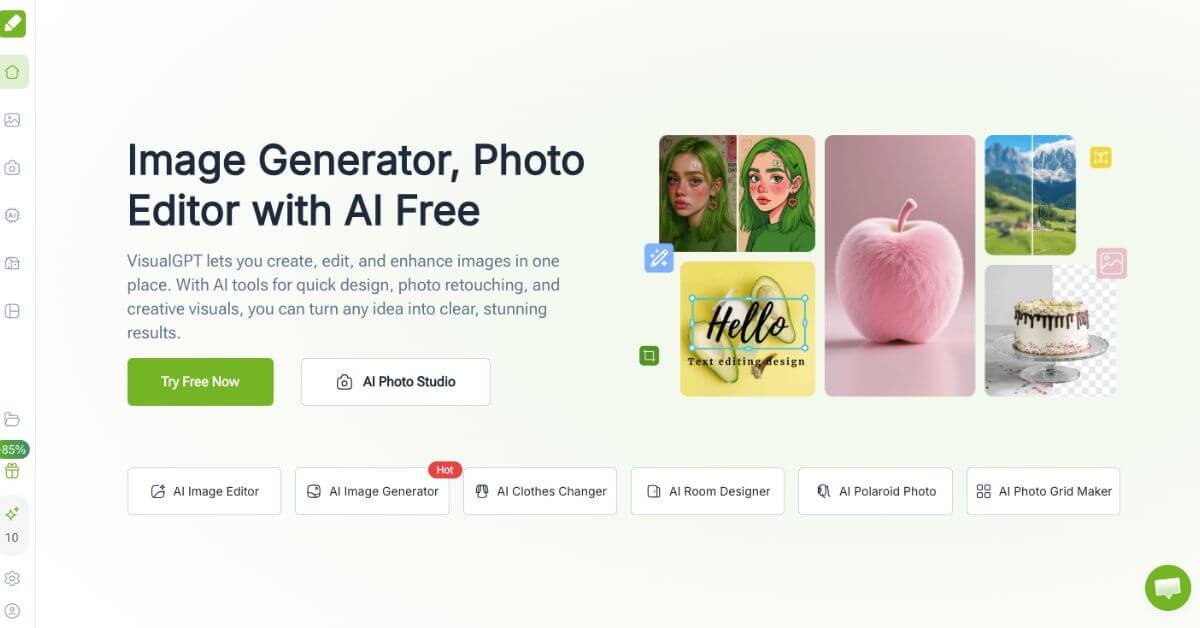
Most AI image tools solve one narrow problem. You generate images, or you edit photos, or you remove backgrounds. VisualGPT attempts to reduce that fragmentation by placing many common visual tasks into a single web interface. The core idea is simple: instead of moving between multiple tools for social graphics, product images, room mockups, or quick edits, you stay in one place and let AI handle the heavy lifting.
In practice, VisualGPT feels designed for real-world, time-constrained workflows. You upload an image or describe what you need, choose a tool, and get a result without tuning dozens of settings. The platform emphasizes speed and low friction rather than experimentation. That makes it approachable for non-designers and busy operators who care more about outcomes than process.
Below is a detailed, practical review written for marketers, founders, educators, and small teams deciding whether this tool fits their stack.
Quick summary
VisualGPT is a browser-based AI visual creation and editing platform that combines image generation, photo editing, background removal, and interior visualization into one workflow. It is designed for people who need usable visuals quickly without learning complex design software. Based on hands-on testing and a review of available public feedback, VisualGPT is worth trying if your priority is speed, convenience, and low cost rather than deep creative control.
This tool works best for marketers, solo founders, educators, ecommerce operators, and everyday users who want acceptable-to-good visuals with minimal setup. It is not ideal for professional designers who need pixel-level precision or teams that require advanced collaboration and brand governance features.
In short, VisualGPT trades depth for accessibility. If you value fast output and an all-in-one approach over fine-grained control, it can be a practical addition to your content stack.
Verdict: Detailed Summary
VisualGPT is best viewed as a convenience-first AI visual platform rather than a creative powerhouse.
Best for
Marketers and social media managers producing frequent visual content
Educators and researchers creating diagrams and visuals for presentations
Individuals who want usable visuals without learning design tools
Not for
Professional designers who need advanced layer control and precision
Creative teams managing strict brand systems
Users who want deep prompt engineering and model customization
Final rating
Reviewer rating: 4.3 out of 5
Public ratings on major review platforms like G2 and Capterra are currently limited or unavailable, likely due to VisualGPT being relatively new and consumer-focused. The rating above is based on hands-on testing, feature coverage, pricing, usability, and comparison with similar tools in the same category.
The decision comes down to expectations. VisualGPT performs well at what it aims to do, but it should not be mistaken for a replacement for professional design software.
What Is VisualGPT?
VisualGPT is a web-based AI platform for generating and editing images using natural language and simple inputs. It combines multiple AI-powered visual tools such as text-to-image generation, photo enhancement, background removal, interior design mockups, and creative transformations into a single interface.
The main problem it solves is fragmentation. Many users rely on separate tools for image generation, editing, resizing, and enhancement. VisualGPT consolidates those common tasks so users can move from idea to usable visual without switching platforms.
Unlike generic AI image generators that focus primarily on artistic output, VisualGPT leans toward practical visuals. Its tools are structured around common use cases like social media posts, product photos, room designs, and educational visuals. The interface avoids advanced settings, which reduces the learning curve but also limits creative flexibility.
In simple terms, VisualGPT is built for speed and accessibility. It prioritizes results that are good enough to publish quickly rather than results that require refinement and creative iteration.
How VisualGPT Works
VisualGPT follows a straightforward workflow designed for non-technical users.
Typical usage flow
Open the web app, often without mandatory login
Choose a tool such as image generator, background remover, or room designer
Upload an image or enter a short text description
Let the AI process the request using a selected model
Review, download, or refine the result
Under the hood, VisualGPT integrates multiple AI image models and applies them contextually depending on the task. Users do not need to understand which model is doing what. The platform abstracts those decisions away.
This simplicity is intentional. It reduces friction but also means advanced users cannot deeply customize parameters. For the target audience, this trade-off is usually acceptable.
Key Features
AI Image Generator
The image generator converts text descriptions into visuals suited for general-purpose use.
AI Image Editor
The editor allows users to enhance or modify existing images.
Background Remover
This feature isolates subjects from backgrounds automatically.
AI Room and Interior Design Tools
VisualGPT includes tools for visualizing interior and exterior spaces.
Visual Content Generators
Tools for infographics, mind maps, and diagrams.
Real-World Use Cases
Founders and solo operators Use VisualGPT to quickly create landing page visuals, pitch deck graphics, and social posts without hiring a designer.
Marketing teams Generate consistent visual content for campaigns, ads, and social media with minimal turnaround time.
Ecommerce businesses Enhance product photos, remove backgrounds, and create promotional banners without complex editing tools.
Educators and researchers Turn concepts into diagrams, charts, and visual explanations for lectures and reports.
Real estate professionals Produce interior mockups and enhanced property images for listings and brochures.
In all these scenarios, the value comes from speed and accessibility rather than creative depth.
VisualGPT offers a free plan with limited credits, allowing users to test most features before committing. Paid plans start at approximately $4.90 per month, which is significantly lower than many competing AI visual tools.
Who should pay
Users producing visuals regularly
Small businesses replacing multiple tools
Marketers with ongoing content needs
Who should avoid upgrading
Users with very occasional needs
Designers already invested in professional software
The credit-based system is straightforward, but heavy users should monitor usage to avoid unexpected limits.
Best Alternatives & Comparisons
VisualGPT is not the only option in this space. Alternatives may be a better fit depending on priorities.
Midjourney Better for artistic image generation, but lacks editing and practical workflows.
Canva AI Stronger design templates and collaboration features, but higher cost at scale.
Adobe Firefly Best for professionals, but requires familiarity with Adobe tools.
Leonardo AI More control over image generation, less beginner-friendly.
Remove.bg Superior background removal, but single-purpose.
VisualGPT makes the most sense when convenience and cost matter more than specialization.
Frequently Asked Questions (FAQ)
Is VisualGPT suitable for beginners?
Yes. The interface is simple and does not require prior design experience.
Does VisualGPT require installation?
No. It runs entirely in the browser.
Can VisualGPT replace Photoshop?
No. It covers common tasks but lacks advanced editing features.
Is there a free plan?
Yes. A limited free plan is available for testing.
Who should avoid VisualGPT?
Professional designers needing precision and full creative control.
Final Recommendation
VisualGPT is a practical AI visual tool for people who value speed, simplicity, and affordability. It works best as a utility platform for everyday visual needs rather than a creative studio for advanced design work. If you frequently need usable images and want to avoid juggling multiple tools, VisualGPT is worth evaluating.
If your work depends on detailed design systems or collaborative creative workflows, you may outgrow it quickly. For everyone else, it can serve as a reliable, low-friction solution.
To decide, try the free plan, compare it with alternatives, or explore whether listing your own AI tool on itirupati.com makes sense for your audience.