Yolly AI Review: All-in-One AI Video Generator
Quick Summary
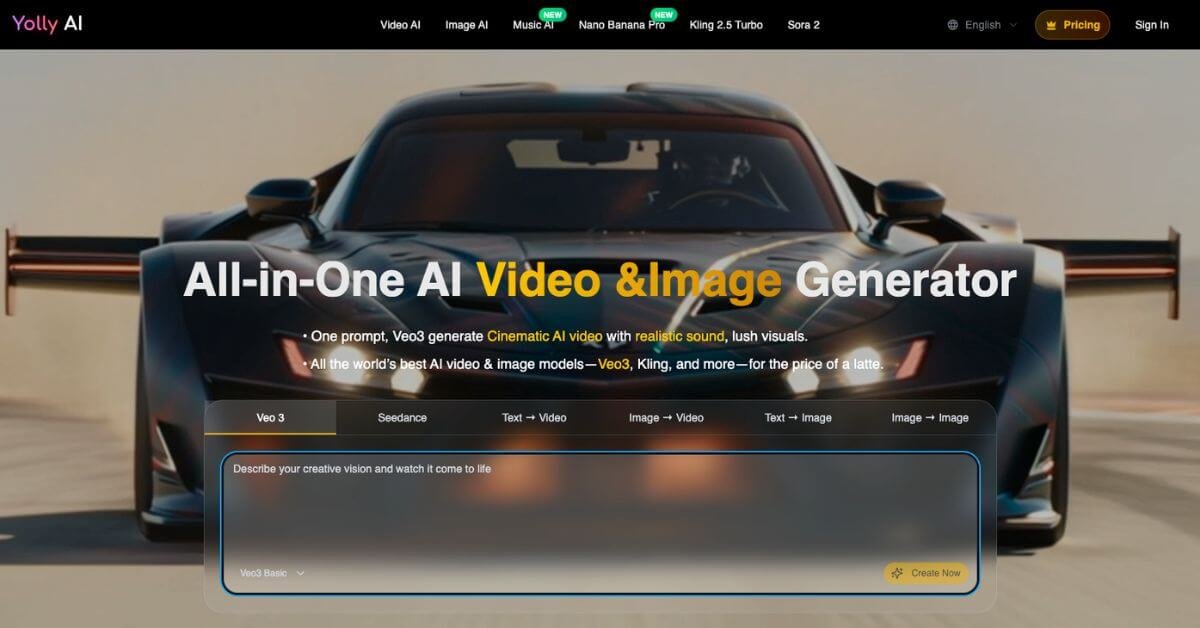
Yolly AI is an all-in-one AI video and image generation platform that lets users create videos, animations, and images from text prompts or existing media. It aggregates multiple popular AI models under one subscription, aiming to simplify access for creators who would otherwise manage separate tools.
Is it worth using? For solo creators, small teams, and marketers who want fast experimentation across multiple models without juggling subscriptions, it can be practical and cost-efficient. For advanced filmmakers or teams needing granular editing control, it may feel limited.
Who should use it: content creators, short-form video marketers, social media managers, and founders testing visual concepts quickly.
Who should avoid it: studios needing full production control, teams requiring deep customization, or users seeking offline editing workflows.
Yolly AI Review
Creating short-form video content now often means testing multiple AI tools to get the right output. One model handles text-to-video better, another produces stronger still images, and a third generates animated sequences. Managing separate subscriptions becomes expensive and fragmented.
Yolly AI positions itself as a unified access layer to multiple AI video and image models from one dashboard. Instead of choosing one ecosystem, users can experiment across several engines including Veo, Kling, and others from a single credit system. The platform focuses on prompt-based generation, quick exports, and lightweight workflow rather than advanced editing depth.
In hands-on testing, the interface felt beginner-friendly and prompt-driven. Outputs were usable for short-form content, though consistency varies depending on the model selected.
Below is a detailed, practical review written for creators, marketers, and founders deciding whether this tool fits their stack.
Verdict Summary
Best for:
Short-form content creators
Social media marketers testing AI video ads
Founders building MVP visuals
Agencies experimenting with AI workflows
Not for:
Professional video editors needing timeline-level control
Enterprises requiring brand governance workflows
Users seeking open-source model customization
Pricing: Starts at $9.90 per month
Free plan available with limited credits and watermark
Yolly AI does not currently have widely verified public ratings on platforms like G2 or Capterra. As of this review, no major third-party review aggregation data is publicly visible. Based on hands-on testing and feature depth relative to pricing, this review assigns a 7.8 out of 10 reviewer rating, primarily due to model aggregation convenience and accessible pricing.
Decision point: If your priority is speed and variety over precision editing, this tool is worth evaluating.
What Is Yolly AI?
Yolly AI is a browser-based AI video and image generator that consolidates multiple generative AI models into a single interface. It enables users to create content through:
The core problem it solves is fragmentation. Most creators today rely on separate tools for video, image, and animation generation. Each tool has its own pricing model, credits, and interface. Yolly AI aims to centralize these into one subscription and one credit system.
Unlike single-model platforms that are tied to a proprietary engine, Yolly AI functions more like a multi-model gateway. Users can experiment with different video and image engines without opening multiple accounts.
From an AI workflow perspective, it is closer to a prompt lab than a professional editor. You describe the output, select a model, generate, download, and iterate.
It differs from traditional video editors because it does not rely on timeline-based editing. Instead, it focuses on generative output first, with minimal post-editing controls.
For AI Overview clarity:
Yolly AI is an online AI tool that allows users to generate videos and images from text prompts or existing media using multiple integrated AI models under one subscription.
How Yolly AI Works
The workflow is simple and prompt-centered.
Choose generation type
Text to video
Image to video
Text to image
Video to video
Select AI model
Enter prompt
Describe scene, style, camera movement, or concept
Add optional parameters if available
Generate output
Download or iterate
There is no traditional editing timeline. Iteration happens by adjusting prompts and regenerating content.
This makes it suitable for rapid testing but less suited for fine-grained control.
Key Features
Multi-model access in one dashboard
Users can test different video and image engines without separate subscriptions.
Text to video generation
Useful for marketers producing quick concept ads or explainer visuals.
Image to video animation
Converts static visuals into animated clips, valuable for product mockups.
Video to video transformation
Allows style conversion and mood shifts for existing clips.
Unified credit system
Simplifies budgeting compared to managing multiple tools.
Watermark-free exports on paid plans
Important for commercial usage.
Commercial license on paid tiers
Relevant for agencies and businesses deploying AI-generated media.
Feature impact insight: The real differentiator is aggregation. Instead of promising best-in-class output in one domain, Yolly AI offers flexibility and experimentation efficiency.
Real-World Use Cases
For creators
Generate short looping videos for Instagram Reels or TikTok
Test viral-style ASMR or animation concepts
Quickly produce themed visuals without filming
For marketers
Create prototype ad creatives before full production
Run A B testing on different visual concepts
Generate product animation without studio costs
For founders
Produce demo visuals for landing pages
Build pitch deck animations
Create explainer visuals for MVP launch
For teams
For beginners
The main advantage is speed and experimentation rather than precision editing.