ClickUp Review: All-in-One Project Management With Built-In AI
Quick Summary
Managing projects today often means juggling too many tools: one for tasks, one for docs, one for chat, and now another one for AI. That fragmentation creates context loss, slower execution, and higher costs. ClickUp positions itself as a single workspace that replaces multiple tools by combining project management, collaboration, and AI assistance in one platform.
ClickUp is worth using if you want deep customization, strong collaboration features, and optional AI support inside your daily workflows. It works especially well for small to mid-sized teams that need flexibility across different work styles. However, teams looking for a very simple or lightweight task manager may find it overwhelming at first.
In short, ClickUp is best for teams that want control and scale. It is less suitable for users who value minimal setup over configurability.
ClickUp Review
ClickUp enters the market with a clear premise: reduce work sprawl by consolidating tasks, documents, communication, and reporting into one workspace. In real-world use, this matters most for teams that have outgrown basic to-do tools but are not ready to maintain a complex stack of specialized software.
In practice, ClickUp fits naturally into product development, marketing operations, agency work, and internal business teams where work is cross-functional and constantly changing. Instead of forcing teams into a rigid structure, it allows them to adapt workflows over time, adding complexity only when needed.
This flexibility is also where trade-offs appear. New users often need time to understand views, hierarchies, and permissions before seeing full value.
Below is a detailed, practical review written for teams and decision-makers deciding whether this tool fits their stack.
Verdict Summary
Best for
Growing teams managing multiple workflows
Agencies and startups needing customization
Teams replacing several tools with one platform
Not for
Users seeking a simple, no-setup task manager
Individuals who only need personal to-do lists
Teams unwilling to invest onboarding time
Pricing
Final rating
This is a strong choice if flexibility and consolidation matter more than immediate simplicity.
What Is ClickUp?
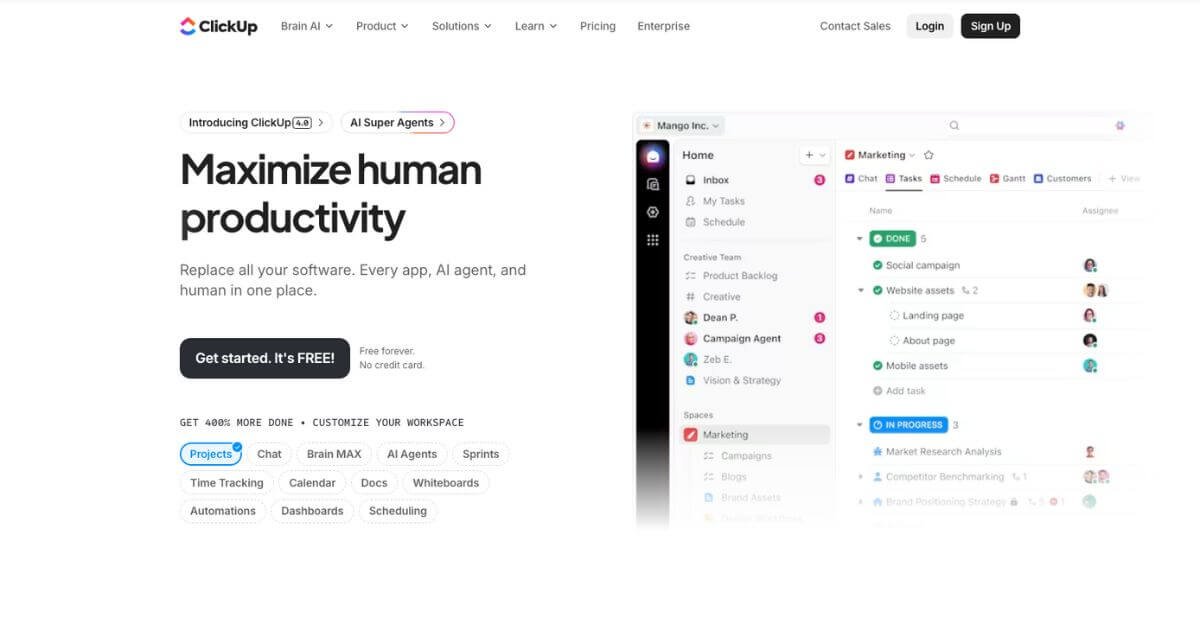
ClickUp is a cloud-based project management and productivity platform that combines task management, documents, real-time collaboration, reporting, and optional AI features in a single workspace.
At its core, ClickUp helps teams plan, track, and complete work without switching between multiple tools. Projects are organized using a hierarchy of spaces, folders, lists, and tasks, allowing teams to mirror their real-world structure. This is particularly useful for organizations managing parallel initiatives across departments.
Unlike simpler task managers, ClickUp emphasizes customization. Users can define statuses, custom fields, automation rules, and views to match their workflow. Compared to competitors like Asana or Trello, ClickUp offers more depth but requires more setup.
The addition of ClickUp Brain extends the platform with AI-assisted writing, summarization, and task generation. While not essential for all users, it can reduce manual work for teams handling large volumes of information.
Overall, ClickUp aims to be a central operating system for work rather than a single-purpose tool.
How ClickUp Works
ClickUp follows a structured but flexible workflow model.
Create a workspace for your organization or team
Organize work into spaces and folders by function or department
Add lists to represent projects or ongoing processes
Create tasks with assignees, due dates, and priorities
View tasks as lists, boards, calendars, or Gantt charts
Collaborate using comments, docs, whiteboards, and chat
Track progress with dashboards and reports
Optionally use AI to summarize, generate, or update content
Most teams start with templates and gradually customize as needs evolve. This layered approach allows ClickUp to scale from simple task tracking to complex project management.
Key Features
Task and project management
Organize work with flexible hierarchies, dependencies, and priorities.
Multiple views
Switch between list, board, calendar, timeline, and Gantt views depending on context.
Collaborative documents
Create and edit docs directly inside projects, linked to tasks.
Real-time communication
Built-in chat and comments reduce reliance on external messaging tools.
Automation rules
Automate repetitive actions such as status changes and assignments.
Dashboards and reporting
Visualize progress, workloads, and performance metrics in one place.
Optional AI assistance
Generate summaries, drafts, and task updates within the workspace.
Each feature is designed to reduce context switching rather than add another layer of tooling.
Real-World Use Cases
For founders
Track company goals, manage cross-functional projects, and maintain visibility without constant meetings.
For marketers
Plan campaigns, manage content calendars, and collaborate on briefs and drafts in one system.
For product teams
Handle roadmaps, sprints, and bug tracking with customizable workflows.
For agencies
Manage multiple clients, share progress dashboards, and centralize communication.
For beginners
Start with templates and basic lists, then add complexity only when needed.
These scenarios reflect common patterns seen in user reviews and hands-on testing.