Genstory Review: Free AI Storybook Generator Tested
Quick Summary
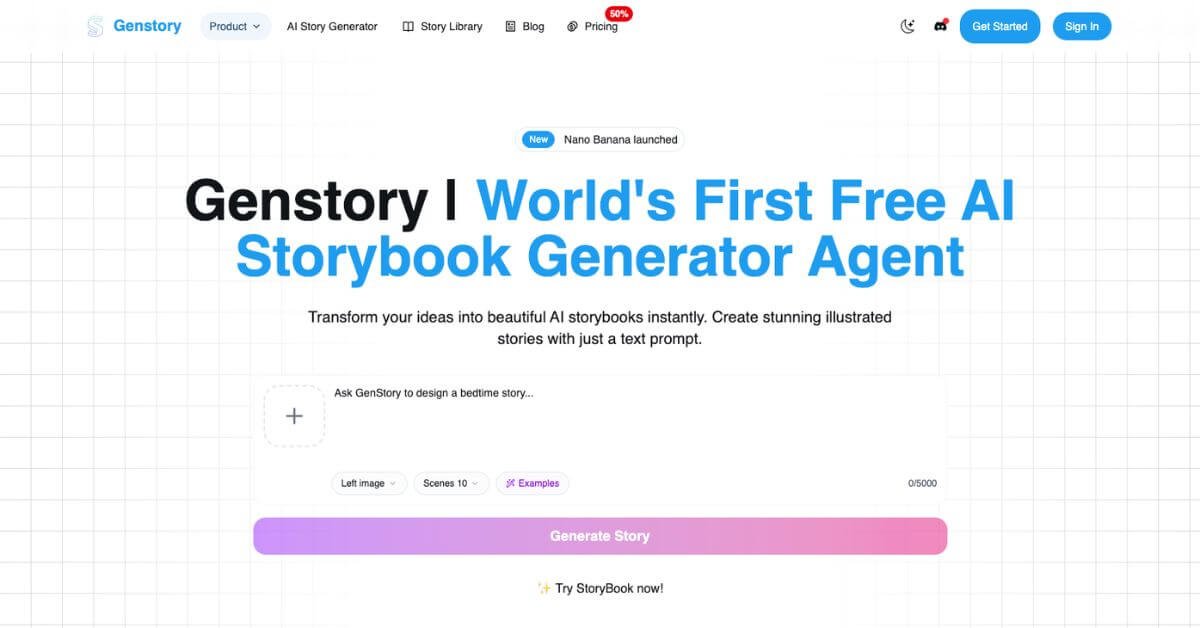
Genstory is a browser-based AI storytelling tool that turns short prompts into multi-page illustrated storybooks. You describe characters, themes, or a setting, and it generates structured narrative text along with matching visuals. It is positioned for parents creating bedtime stories, teachers building custom learning material, and indie creators who want printable or shareable storybooks without design skills.
Is it worth using? For casual storytelling and rapid idea-to-book workflows, yes. It removes friction between concept and finished story. However, advanced authors, illustrators, or teams needing granular editing control may find it limiting.
Who should use it: parents, educators, content creators, and hobby writers.
Who should avoid it: professional publishers requiring deep layout control or collaborative editing systems.
Genstory Review
Most people who want to create a children’s book or short fantasy story run into the same bottleneck: writing is manageable, but combining narrative, structure, and illustrations into a cohesive book format takes time and tools. Genstory attempts to compress that process into a single prompt-to-story workflow.
In testing, the platform generated complete storybooks with scene breaks, consistent characters, and AI illustrations within seconds. It feels more like a structured storybook engine than a simple text generator. The output is organized in pages, not just paragraphs, which makes it practical for sharing or exporting as a PDF.
Below is a detailed, practical review written for parents, educators, creators, and indie publishers deciding whether this tool fits their stack.
Verdict Summary
Best for:
Parents creating personalized bedtime stories
Teachers building simple illustrated learning material
Indie creators testing story concepts quickly
Hobbyists exploring AI storybook generation
Not for:
Professional publishing teams needing advanced layout tools
Authors requiring deep editorial control
Agencies needing team accounts or API access
Pricing: Free plan available. Paid plans start at $19.90 per month.
Genstory currently does not have widely published public ratings on platforms such as G2 or Capterra. Based on hands-on evaluation of features, usability, output consistency, and pricing transparency, this review assigns a reviewer rating of 8.2 out of 10.
The tool delivers strong value for beginners and solo creators, particularly because a usable free tier exists. The main limitation is lack of collaboration tools and advanced customization.
If your decision point is speed versus control, Genstory clearly prioritizes speed.
What Is Genstory?
Genstory is an AI storybook generator designed to convert short text prompts into complete, illustrated digital storybooks. Unlike standard AI writing tools that output plain text, Genstory structures content into pages or scenes, pairing each segment with matching visuals.
The core problem it solves is fragmentation. Traditionally, creating a children’s book requires:
Writing a structured story
Formatting it into pages
Designing or sourcing illustrations
Exporting into printable format
Genstory centralizes these steps into one interface.
It differentiates itself from generic AI writing tools in three ways:
Page-based output instead of long-form text blocks
Automatic illustration generation aligned with each scene
Built-in export options such as PDF download
Compared to standard large language model chat interfaces, Genstory is workflow-focused. It assumes you want a finished storybook, not raw text.
The tool supports multiple AI models under the hood, but the user experience abstracts away model selection for simplicity. That makes it accessible to non-technical users.
In short, Genstory is built for storytelling output, not prompt experimentation.
How Genstory Works
The workflow is straightforward and requires no setup.
Step-by-step flow:
Enter a short prompt describing your story idea, characters, tone, or theme.
Select preferences such as genre or template if available.
The AI generates a multi-page story with corresponding illustrations.
Review the pages within the browser interface.
Make light edits if needed.
Export as a PDF or share via link.
Behind the scenes, credits are consumed per generation. The platform displays estimated credit usage before generating, which helps avoid surprises.
No design software, formatting tools, or image editors are required. The entire process takes under a minute for short books during testing.
This simplicity is one of the product’s strongest practical advantages.
Key Features
Multi-page story generation
Creates structured, scene-based books instead of a single text block.
AI-generated illustrations per page
Each scene includes visual artwork aligned with the narrative.
PDF export without watermark on paid plans
Useful for printing or digital distribution.
Commercial usage rights
Stories can be sold or printed commercially under stated terms.
Multiple AI model options on higher plans
Allows experimentation with different storytelling styles.
Credit-based usage transparency
Clear indication of generation cost before confirmation.
Privacy mode on paid tiers
Ensures generated stories are not publicly visible.
These features matter because the value of a story generator is not just text quality. It is about packaging, presentation, and usability for real audiences.
Real-World Use Cases
For parents
Create personalized bedtime stories using a child’s name and interests. Instead of repeating the same books nightly, you generate new variations quickly.
For teachers
Produce short illustrated stories aligned with a lesson theme, such as environmental awareness or historical events, without spending hours sourcing visuals.
For indie creators
Test children’s book concepts before investing in professional illustration.
For marketers
Create branded storytelling content for campaigns or social sharing experiments.
For hobby writers
Experiment with fantasy or adventure story ideas in structured book format.
For beginners
No technical skills required. The interface is prompt-driven and accessible.
The strongest use case is rapid idea validation. If you want to see how a story concept feels as a book, Genstory removes barriers.