Nano Banana Pro AI Image Review: Editing and Generation in One Tool
Quick Summary
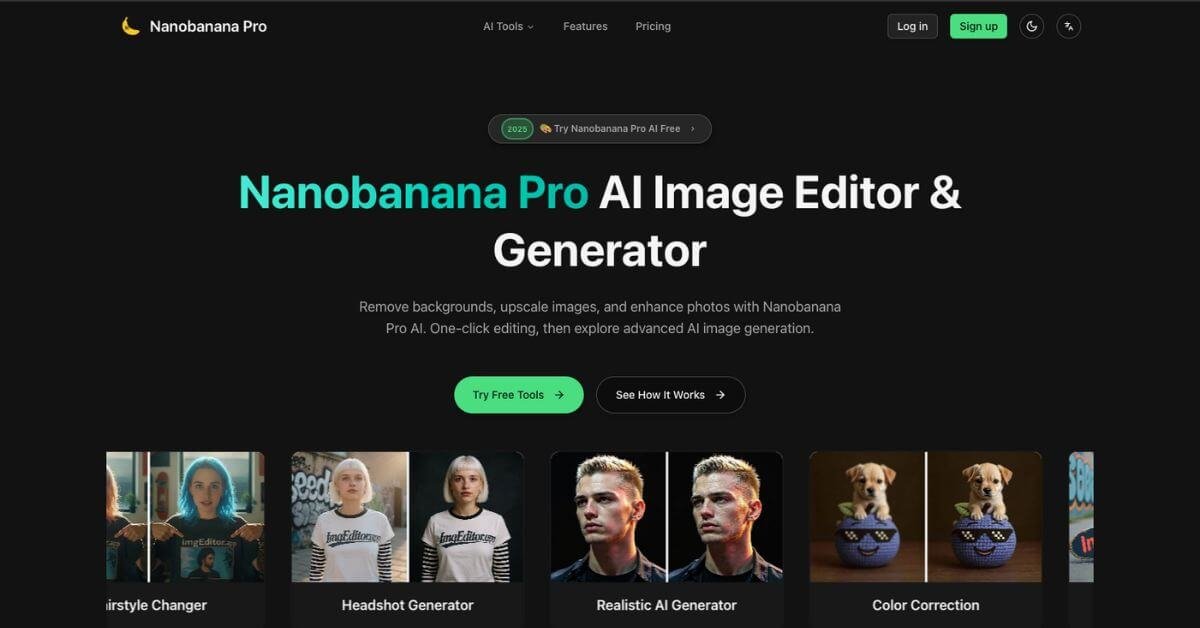
Nano Banana Pro AI Image is an all-in-one AI image editor and generator designed to simplify common visual tasks like background removal, image upscaling, photo enhancement, and AI-based image generation. It aims to replace a stack of design tools with a single, browser-based workflow that works without advanced design skills.
Is it worth using? For individuals and small teams who need fast, acceptable-quality visuals without learning Photoshop, Nano Banana Pro is a practical option. It trades deep manual control for speed and convenience.
Who should use it: founders, marketers, ecommerce sellers, and creators who regularly need clean images, headshots, or social visuals.
Who should avoid it: professional designers who require precise layer control, color grading accuracy, or print-ready outputs.
Overall, Nano Banana Pro AI Image is useful when speed and simplicity matter more than creative depth.
Nano Banana Pro AI Image Review
Nano Banana Pro positions itself around a familiar problem. Most people don’t need complex design software; they need decent images, fast. Product photos, profile pictures, marketing visuals, or cleaned-up images often become blockers simply because traditional tools are time-consuming or expensive.
Nano Banana Pro fits into workflows where visuals are necessary but not the core job. Instead of opening multiple tools for background removal, enhancement, and generation, users upload an image, choose an action, and let the AI handle the processing. The platform emphasizes one-click edits and preset-driven results rather than manual fine-tuning.
The experience feels closer to using a utility than a creative suite. You upload, wait a few seconds, download, and move on. That framing matters when deciding whether this tool belongs in your stack.
Below is a detailed, practical review written for founders, marketers, and creators deciding whether this tool fits their stack.
Verdict Summary
Best for
Solo founders and marketers creating visuals regularly
Ecommerce sellers needing quick product images
Creators who want stylized AI images without manual editing
Users avoiding recurring Adobe subscriptions
Not for
Professional designers working on complex compositions
Teams needing collaborative design workflows
Print-focused projects requiring precise color control
Final rating
Public ratings on platforms like G2 and Capterra are currently unavailable, likely due to the tool’s relatively recent launch and niche audience. Based on hands-on testing and comparison with similar tools, a reviewer-based rating of 7.8 out of 10 is reasonable. The score reflects strong usability and breadth of features, balanced against limited customization depth.
As a decision tool, Nano Banana Pro is solid when judged on time saved rather than creative flexibility.
What Is Nano Banana Pro AI Image?
Nano Banana Pro AI Image is a web-based AI image editor and generator that combines several common visual tasks into a single interface. Its primary purpose is to help non-designers create usable images quickly, without learning professional software.
At its core, the tool focuses on three problem areas:
Cleaning images by removing backgrounds or unwanted objects
Improving image quality through upscaling and enhancement
Generating new images or styles from existing photos using AI
Unlike generic AI image generators that start from text prompts alone, Nano Banana Pro leans heavily on image-to-image workflows. Users upload a photo and apply transformations such as headshot generation, style changes, or background replacement.
What differentiates it from traditional editors is intent. It does not try to replicate Photoshop. Instead, it reduces decisions. Most actions are preset-driven, which limits control but increases speed. Compared to standalone tools for background removal or upscaling, Nano Banana Pro bundles multiple utilities into one dashboard, reducing tool switching.
How Nano Banana Pro AI Image Works
The workflow is intentionally simple and linear.
Typical process
Upload an image in a supported format
Choose a task such as background removal, enhancement, or generation
Adjust minimal settings if available
Let the AI process the image, usually under 30 seconds
Download or reuse the output for another transformation
Under the hood, the system
Detects subjects and edges automatically
Applies trained AI models depending on the selected task
Prioritizes speed over manual adjustment layers
Outputs flattened images ready for immediate use
There is no timeline, layer stack, or complex UI. That design choice reinforces the tool’s positioning as a fast image utility rather than a creative studio.
Key Features
Nano Banana Pro AI Image offers a wide range of features, though many share a similar underlying workflow.
AI Background Remover
Useful for product photos, profile images, and marketing visuals where clean isolation is required. Works best with clear subject separation.
AI Image Upscaler
Improves resolution of low-quality images, logos, or older photos. Results are suitable for web use, though not always print-grade.
AI Image Enhancer
Automatically adjusts lighting, sharpness, and contrast. Helpful for amateur photos that need quick improvement.
Object Removal
Removes unwanted elements from images with minimal user input. Effective for simple backgrounds, less precise with complex scenes.
Headshot Generator
Converts casual photos into professional-looking headshots. Useful for LinkedIn or internal profiles, with predictable but limited style variety.
Style and Character Generators
Includes anime, Pixar-style, and other artistic transformations. Best suited for social content and experimentation rather than branding.
Each feature favors speed and accessibility over deep customization.
Real-World Use Cases
Founders and solo operators
A startup founder preparing a landing page can generate product visuals, clean screenshots, and profile images without outsourcing design work.
Marketers
Marketing teams can quickly produce social media images, ad creatives, and blog visuals without waiting for design bandwidth.
Ecommerce sellers
Sellers can remove backgrounds, standardize product images, and upscale photos for marketplaces like Amazon or Shopify.
Content creators
Creators can generate stylized visuals, thumbnails, and profile images without spending hours editing.
Recruiters and professionals
The headshot generator provides a fast alternative to professional photography for internal or online profiles.
In each case, Nano Banana Pro replaces time-consuming manual steps rather than offering creative exploration.