G Maps Extractor
Extract any business data from Google Maps in seconds — names, phones, emails, reviews, and social profiles, export-ready.
G Maps Extractor Review: The No-Code Google Maps Scraper That Turns Local Search Into Structured Lead Data
Google Maps holds the most comprehensive database of local business information available anywhere — every business name, phone number, address, email, website, rating, review count, and social profile for millions of businesses globally. Accessing that data manually means hours of copy-pasting. G Maps Extractor automates the entire process — enter a keyword and location, start the scraper, and receive a structured spreadsheet of every matching business with all available data fields populated, ready for outreach, prospecting, local SEO research, or market analysis.
Quick Summary
G Maps Extractor is a no-code Google Maps scraping platform that extracts structured local business data — names, addresses, phones, emails, websites, social profiles, ratings, reviews, photos, and coordinates — accessible via browser, Chrome or Edge extension, and API, with export to CSV, Excel, or JSON.
Is it worth using? Yes for sales teams, marketing agencies, local SEO professionals, and researchers who need structured local business data at scale without manual Google Maps research.
Who should use it? Lead generation specialists, sales development reps, local SEO agencies, marketing researchers, and business development professionals who need structured Google Maps business data exported into their existing tools and workflows.
Who should avoid it? Teams whose data needs are covered by a CRM with built-in enrichment, or users who need only occasional single-business lookups where manual search is sufficient.
Verdict Summary
Best for
- Sales teams and SDRs who need bulk local business lead lists — restaurants, dentists, law firms, contractors — with phone numbers, emails, and websites already populated for outreach without manual research
- Local SEO agencies who need competitor and market data from Google Maps across multiple locations and keyword combinations for client reporting and strategy
- Market researchers and business analysts who need structured local business datasets — ratings, review counts, categories, and geographic coordinates — for analysis across cities or regions
Not for
- Teams needing real-time dynamic data rather than point-in-time scraping snapshots
- Users who need CRM-integrated prospecting with contact verification and enrichment built in
- Individual users with only occasional single-location lookup needs
Rating
⭐⭐⭐⭐ 4.3 / 5
What Is G Maps Extractor?
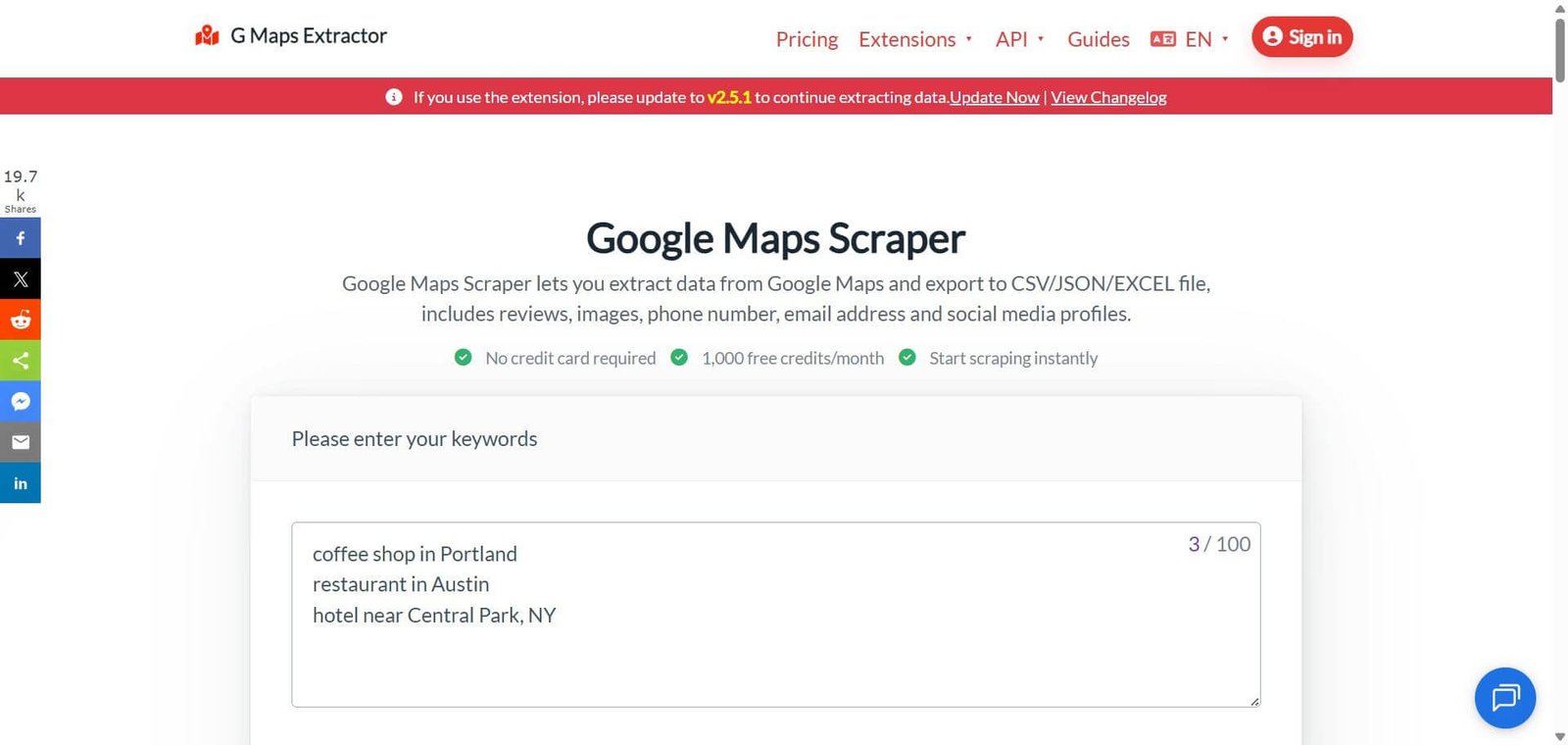
G Maps Extractor is a Google Maps data extraction platform that automates the collection of publicly available local business information. It runs as an online cloud tool, a Chrome or Edge browser extension, and an API — giving users flexibility in how they access the scraping capability. Users enter a keyword and location, the tool scrapes matching Google Maps results, and structured data is delivered in CSV, Excel, or JSON format ready for import into CRMs, email outreach tools, spreadsheets, or analytics platforms.
The platform is built around three access modes — Online Scraper for cloud-based bulk jobs, browser Extension for on-demand extraction during active browsing, and API for developer integration into automated data pipelines — covering use cases from individual researcher to enterprise data operations.
How G Maps Extractor Works
- Enter your keyword and location. Type the search term and location — “coffee shop in Portland” or “dentist in Austin, TX” — exactly as you would search on Google Maps. G Maps Extractor processes the search and begins collecting results.
- Run in the cloud. The Online Scraper runs jobs in the cloud without requiring a browser to stay open — submit the job and collect results when processing completes.
- Or use the browser extension. Install the Chrome or Edge extension and run extractions directly from your active Google Maps session — useful for targeted single-search extractions during active research.
- Or integrate via API. Connect G Maps Extractor’s API to automated workflows — triggering scraping jobs programmatically and receiving structured data directly into pipelines and applications.
- Collect all available data fields. G Maps Extractor collects every publicly available field — name, phone, email, website, address, social media profiles, rating, review count, reviews text, photos, hours, categories, coordinates, and more.
- Export in your preferred format. Download results as CSV for spreadsheets, Excel for direct analysis, or JSON for developer and API workflows — structured and ready for immediate use.
Data Fields Extracted
G Maps Extractor collects every publicly available data point from Google Maps listings:
- Name — Business name as listed on Google Maps
- Phone — Primary phone number from the listing
- Email — Email address where publicly available
- Website — Business website URL
- Social Media — Facebook, Instagram, Twitter/X, LinkedIn, and other social profiles
- Address — Full street address
- Municipality — City and region
- Categories — Business type and subcategories
- Description — Business description from the listing
- Context — Contextual information about products and services offered
- Claimed — Whether the listing has been claimed by the business owner
- Postcode — Postal code
- Time Zone — Local time zone of the business
- Review Count — Total number of Google reviews
- Reviews — Individual review text content
- Average Rating — Overall star rating
- Review URL — Direct link to the Google review page
- Review URL (Business) — Business-specific review submission URL
- Google Knowledge URL — Google Knowledge Panel link
- Latitude / Longitude — Precise geographic coordinates
- Claiming Status — Verification status of the listing
- Featured Image — Primary business photo URL
- Plus ID / Place ID — Google’s unique place identifier for API use
Key Features
- No-code online scraper requiring no technical setup — enter keyword and location, start scraping
- Bulk keyword scraping — run multiple keyword and location combinations simultaneously
- Chrome and Edge browser extension for on-demand extraction during active Maps sessions
- API access for developer integration into automated data pipelines
- GDPR compliant — collects only publicly available information
- Export to CSV, Excel, and JSON formats
- 30 plus data fields per business listing extracted in one job
- 12,500 plus customers across lead generation, SEO, and research use cases
- 83M plus phone numbers, 80M plus addresses, 6.5M plus emails extracted to date
- No code required — clean click-interface accessible without technical knowledge
Real-World Use Cases
- Sales lead generation: An SDR team needs a list of 500 independent restaurants in Chicago with phone numbers and websites for a restaurant software outreach campaign — they enter “restaurant in Chicago” into G Maps Extractor, run the job, and receive a structured spreadsheet with all available contact data within minutes, ready for CRM import and outreach sequencing.
- Local SEO competitor research: A local SEO agency uses G Maps Extractor to pull all competing businesses in a client’s category across their target city — collecting ratings, review counts, categories, and addresses to build a competitive landscape analysis that informs the client’s local search strategy.
- Multi-location market mapping: A franchise operator uses G Maps Extractor with bulk keyword scraping to collect data across 50 cities simultaneously — mapping competitor density, average ratings, and coverage gaps to inform their next site selection decision.
- Real estate prospecting: A commercial real estate broker uses G Maps Extractor to identify all businesses in a specific retail category within a target radius — collecting contact information for direct outreach about lease opportunities without manual Google Maps research.
- Market research dataset: A researcher uses G Maps Extractor to build a dataset of all businesses in a specific vertical across a region — with ratings, review counts, and coordinates — for academic or commercial market analysis that requires structured geographic business data.
Pros and Cons
| Pros | Cons |
|---|---|
| No code required — anyone can run a scraping job without technical knowledge | Extracts publicly available data only — email availability varies by listing completeness |
| 30 plus data fields per listing covers every usable data point from a Google Maps result | Data reflects Google Maps listing accuracy — incomplete listings produce incomplete extracts |
| Three access modes — Online, Extension, API — cover every use case from individual to enterprise | Cloud scraping speed depends on job size — very large jobs take longer to process |
| GDPR compliant — collects only publicly available information | Free plan limited to 1,000 records per month with 2 keyword maximum per task |
| Bulk keyword scraping handles multiple locations and keywords simultaneously | Email field availability depends on whether businesses have listed emails publicly on Maps |
| 100% money back guarantee within 7 days if expectations are not met | API access requires technical integration — not self-serve for non-developers |
Pricing & Plans
Free — $0/month
- 1,000 records per month
- Max 2 keywords per task
- CSV/Excel/JSON export
- Email and social media fields
- 1 seat
Basic — $29/month (Limited Time Offer — was $49)
- 80,000 records per month
- Max 10 keywords per task
- CSV/Excel/JSON export
- Email and social media fields
- 1 seat
Professional — $149/month (Best Value — was $179)
- 300,000 records per month
- Max 50 keywords per task
- CSV/Excel/JSON export
- Email and social media fields
- 3 seats (coming soon)
Business — $359/month (was $429)
- 1,000,000 records per month
- Max 100 keywords per task
- CSV/Excel/JSON export
- Email and social media fields
- 10 seats (coming soon)
Advanced — $799/month (was $959)
- 3,000,000 records per month
- Max 200 keywords per task
- CSV/Excel/JSON export
- Email and social media fields
- 20 seats (coming soon)
Enterprise — Custom pricing
- Custom record volumes
- Custom keyword limits
- Contact for tailored plan
Best Alternatives & Comparisons
- Outscraper — Similar Google Maps scraping with comparable data fields and API access
- Apify — Better for broader web scraping beyond Google Maps with extensive actor library
- PhantomBuster — Better for LinkedIn and social platform data extraction alongside web scraping
- Scrapingbee — Better for developer-focused web scraping infrastructure for custom use cases
Frequently Asked Questions (FAQ)
G Maps Extractor is a no-code Google Maps scraping platform that extracts structured local business data — names, phones, emails, websites, social profiles, ratings, reviews, coordinates, and more — exportable to CSV, Excel, or JSON for lead generation, local SEO, and market research.
Yes, G Maps Extractor offers a free plan with 1,000 records per month and 2 keywords per task. Paid Online Scraper plans start at $29/month for 80,000 records.
G Maps Extractor collects only publicly available information from Google Maps listings — the same data visible to any user browsing Google Maps. The platform is GDPR compliant as it gathers only information that businesses have made public. Users should ensure their own use of extracted data complies with applicable regulations in their jurisdiction.
The Online Scraper runs cloud-based bulk jobs without a browser staying open — best for large-scale extraction. The Chrome and Edge Extension runs directly from an active Google Maps browser session — best for targeted on-demand extraction. The API integrates scraping into automated data pipelines and applications programmatically.
G Maps Extractor extracts exactly what appears on each Google Maps listing. Data accuracy reflects the completeness of each business’s Google Maps profile — well-maintained listings with complete information produce the most complete extracts.
Yes, email addresses are extracted where businesses have listed them publicly on their Google Maps profile. Email field availability varies by listing — not all businesses include email addresses in their Maps listings, so email coverage depends on the specific business category and market.
Plans range from 1,000 records per month on the free plan to 3,000,000 records per month on the Advanced plan. Enterprise plans offer custom volumes for the highest-volume use cases.
Final Recommendation
G Maps Extractor is the most accessible no-code solution for sales teams, agencies, and researchers who need structured local business data from Google Maps at scale without technical scraping knowledge or development resources. The combination of three access modes — Online, Extension, and API — covers use cases from individual researcher to enterprise data pipeline, and the 30 plus data fields per listing deliver more complete business intelligence than manual research could ever produce at comparable volume. For any team whose work involves identifying, contacting, or analysing local businesses, G Maps Extractor converts hours of manual Google Maps research into minutes of structured, export-ready data.
Next steps