
GMapsScraper.AI
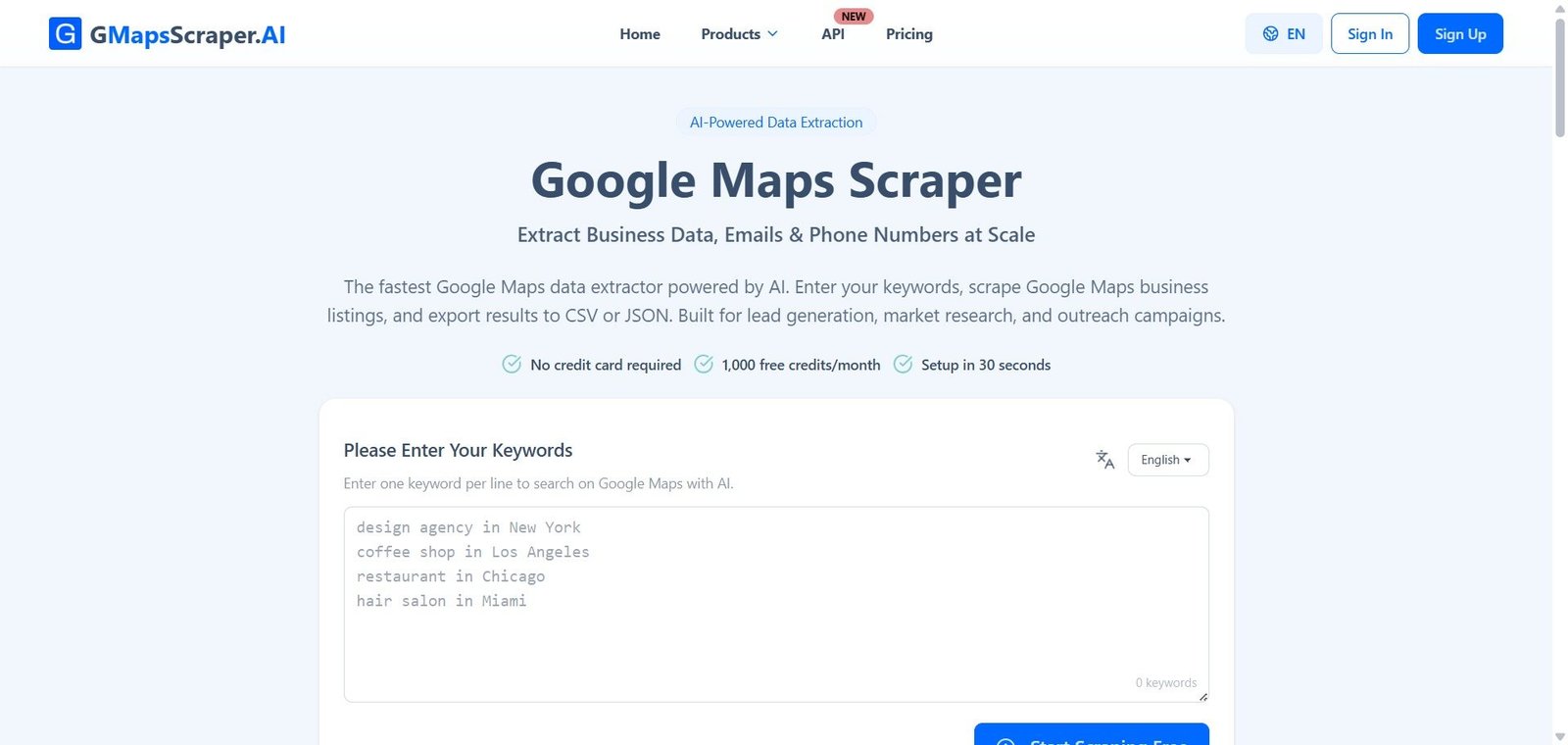
Enter keywords, get business names, emails, phone numbers, reviews, and social links from Google Maps — exported to CSV or JSON in minutes, no software to install.
GMapsScraper.AI Review: The Cloud-Based Google Maps Extractor That Turns Local Search Results Into Structured Business Data at Scale
Building a prospect list from Google Maps manually is one of the most time-consuming tasks in B2B sales and marketing — search a keyword, open each listing, copy the name, address, phone number, and website, paste them into a spreadsheet, repeat for the next listing, and multiply this by hundreds of locations and dozens of keywords. GMapsScraper.AI eliminates this entirely. Enter keywords in batches, set the region and language, and the cloud platform processes them in parallel — returning 39 plus structured data fields per business listing including email addresses, social media profiles, Google ratings, review counts, and opening hours, exported directly to CSV or JSON. No browser extension, no desktop software, no manual copying.
Quick Summary
GMapsScraper.AI is a cloud-based Google Maps data extractor — trusted by 7,500 plus businesses — that processes bulk keyword batches in parallel and returns 39 plus structured fields per listing including business name, address, phone number, email, website, Google rating, review count, opening hours, and social media profiles, exported to CSV or JSON for CRM, outreach, and research use, with a free plan of 1,000 credits per month and paid plans from $29/month.
Is it worth using? Yes for B2B sales teams, marketing agencies, SEO consultants, and freelance researchers who need structured Google Maps business data at volume — GMapsScraper.AI reduces hours of manual data collection to minutes of cloud processing.
Who should use it? B2B lead generation specialists, marketing agencies building competitor or prospect databases, SEO consultants running local citation and local pack research, and data researchers gathering location-based business datasets at scale.
Who should avoid it? Teams whose data needs are limited to occasional single-location lookups that the free plan fully covers, or organisations with strict data governance policies requiring them to verify the legal basis for data collection in every target jurisdiction before use.
Verdict Summary
Best for
- B2B sales teams building prospect lists from local business categories across multiple cities — enter “law firm in Chicago”, “law firm in Houston”, “law firm in Phoenix” as a batch and GMapsScraper.AI processes all three in parallel, returning a combined deduplicated dataset ready for CRM import in minutes
- Marketing agencies that pull competitor data and local business landscapes for clients in specific markets — the CSV and JSON export formats integrate directly with client CRM systems and reporting pipelines without reformatting
- SEO consultants building local citation datasets and analysing local pack competition across multiple geographic targets — bulk keyword processing with configurable location and language targeting enables multi-market research at a scale manual collection cannot support
Not for
- Teams whose sole need is occasional single-keyword searches — the free plan’s 1,000 credits per month handles low-volume lookups without any cost commitment
- Organisations in jurisdictions with strict data scraping regulations who have not verified their legal basis for collecting publicly available business data at scale — users are responsible for compliance in their target markets
- Teams needing real-time API integration at enterprise scale for embedded application use — the Google Maps Scraper API product should be evaluated for programmatic access requirements
Rating
⭐⭐⭐⭐ 4.3 / 5
What Is GMapsScraper.AI?
GMapsScraper.AI is a cloud-based Google Maps data extraction platform — built on the premise that the business data visible in Google Maps search results should be accessible to sales teams, agencies, and researchers as structured, exportable data rather than requiring manual lookup and copy-paste for every listing. The platform processes keyword searches entirely on cloud servers, meaning there is no browser extension to install, no desktop application to run, and no local computing resources consumed during extraction.
The tool supports batch processing — up to 100 keywords per task on the Business plan — and parallel concurrent task execution, meaning multiple keyword batches run simultaneously rather than sequentially. A resume feature ensures interrupted tasks continue from the last completed listing rather than restarting from the beginning, making large extraction jobs reliable across connection interruptions or session timeouts.
How GMapsScraper.AI Works
- Enter keywords in batches. Type one keyword per line — “coffee shop in Brooklyn”, “dentist in Austin”, “law firm in Sydney” — with support for up to 100 keywords per task on Business plans. Set the target language and location for each task to narrow results to specific geographic markets.
- Cloud processes in parallel. GMapsScraper.AI runs the keyword searches on cloud infrastructure in parallel — multiple keywords processed simultaneously rather than one at a time, with concurrent task support for running multiple separate jobs simultaneously.
- 39 plus fields extracted per listing. Each business listing returns structured data including: business name, full address, phone number, email address, website, Google rating, review count, opening hours, social media profiles (Facebook, Instagram, LinkedIn, Twitter), and additional business attributes.
- Resume interrupted tasks. If a task is interrupted — connection drop, session timeout, or manual pause — the resume feature picks up from the last completed listing rather than restarting, protecting progress on large extraction jobs.
- Export to CSV or JSON. Download results as CSV for direct spreadsheet or CRM import, or JSON for API-driven workflows and data pipeline integration. CSV format works with Salesforce, HubSpot, Airtable, and any CRM that accepts contact import.
- Use on-demand credits for flexibility. Purchase on-demand credit packs at $15 for 15,000 credits — these never expire and can be used alongside or instead of a subscription for teams with irregular volume needs.
Key Features
- Cloud-based bulk Google Maps scraping — no browser extension, no desktop software, no local processing
- 39 plus structured data fields per listing — name, address, phone, email, website, rating, review count, hours, social media
- Batch keyword processing — up to 100 keywords per task on Business plan
- Concurrent task execution — up to 5 simultaneous tasks on Pro and Business plans
- Task resume feature — interrupted jobs continue from last completed listing
- CSV and JSON export — direct compatibility with CRM systems, email outreach tools, and data pipelines
- Configurable language and location targeting per task for multi-market research
- GDPR compliant data extraction — only publicly available Google Maps business data collected
- Google Maps Reviews Scraper — dedicated product for extracting review data
- Google Maps Photos Scraper — dedicated product for extracting photo data
- Google Maps Scraper API — programmatic access for developer integration (marked NEW)
- Google Maps Scraper MCP — Model Context Protocol integration
- Affiliate programme available
- Trusted by 7,500 plus businesses
- Database: 50M plus places, 45M plus phone numbers, 3M plus emails, 4M plus social media profiles
Real-World Use Cases
- B2B lead generation: A sales development team at a SaaS company needs to build a prospect list of all independent financial advisors across 20 US cities. They enter 20 keyword variations — “financial advisor in [city]” — as a single batch task in GMapsScraper.AI. The platform processes all 20 in parallel, returns a combined dataset of 3,400 businesses with phone numbers, emails, and websites, and the team imports the CSV directly into their CRM for sequencing the same day.
- Agency competitor research: A digital marketing agency is preparing a local market analysis for a restaurant chain client expanding into three new cities. They scrape all restaurants in each city using GMapsScraper.AI — extracting Google ratings, review counts, and social profiles for 800 plus local competitors — producing a competitive landscape dataset that becomes the research foundation for the client presentation.
- SEO local citation building: An SEO consultant managing local SEO for 15 business clients runs GMapsScraper.AI to pull business listing data from relevant local directories and Google Maps — comparing client listing data against scraped competitor data to identify citation gaps and inconsistencies across NAP (name, address, phone) fields.
- Freelance data research: A freelance data researcher receives a brief to compile a dataset of all hotels across 50 cities in Southeast Asia for a travel technology company. Using GMapsScraper.AI with location and language targeting configured for each country, they process the full 50-city dataset in one session — delivering a structured JSON dataset with ratings, review counts, contact information, and social profiles within a single working day.
Pros and Cons
| Pros | Cons |
|---|---|
| Cloud-based with no software installation — works immediately from any browser without setup overhead | Free plan limited to 2 keywords per task and 1 concurrent task — meaningful volume extraction requires a paid plan |
| Batch keyword processing with concurrent task execution — extracts data from multiple markets simultaneously rather than sequentially | Email and social media link extraction not available on the free plan — requires Starter or above at $29/month |
| 39 plus structured fields per listing including emails, social profiles, and opening hours — more comprehensive than most competing scrapers | Users are responsible for verifying the legal basis for data collection in target jurisdictions — compliance is not automatically guaranteed by GDPR-compliant architecture |
| Resume feature protects large extraction jobs from interruption loss — critical reliability feature for multi-thousand listing batches | On-demand credits at $15 for 15,000 provide flexibility but at $0.001 per credit — higher per-credit cost than subscription plans at high volume |
| Free plan with 1,000 credits per month — genuine evaluation access for small volume needs without payment | Subscription credits reset monthly and do not roll over — unused monthly credits are lost at the end of each billing cycle |
Pricing & Plans
Free — $0/month
- 1,000 credits per month (resets monthly)
- 1 credit = 1 business listing
- Up to 2 keywords per task
- Up to 1 concurrent task
- ❌ Email and social media links
- ❌ Export to CSV and JSON
- ✅ Credits renew every month
- ❌ Priority processing
- ❌ Priority support
Starter — $29/month (cancel anytime)
- 50,000 credits per month
- 1 credit = 1 business listing
- Up to 10 keywords per task
- Up to 3 concurrent tasks
- ✅ Email and social media links
- ✅ Export to CSV and JSON
- ✅ Credits renew every month
- ✅ Priority processing
- ✅ Priority support
Pro — $99/month (POPULAR — cancel anytime)
- 300,000 credits per month
- 1 credit = 1 business listing
- Up to 50 keywords per task
- Up to 5 concurrent tasks
- ✅ Email and social media links
- ✅ Export to CSV and JSON
- ✅ Credits renew every month
- ✅ Priority processing
- ✅ Priority support
Business — $199/month (cancel anytime)
- 1,000,000 credits per month
- 1 credit = 1 business listing
- Up to 100 keywords per task
- Up to 5 concurrent tasks
- ✅ All features
On-Demand Credits — $15 for 15,000 credits
- Credits never expire — use anytime
- Flexible pay-as-you-go for irregular volume needs
- Slider available for larger packs (up to 50,000 credits per purchase)
- 1 credit = 1 business listing
Annual billing: Available with 2 months free versus monthly billing.
Best Alternatives & Comparisons
- Phantombuster — Better for broader social media and web scraping automation across LinkedIn, Instagram, and other platforms beyond Google Maps
- Apify — Better for developers needing a full web scraping platform with custom actor development and API-first infrastructure
- Clay — Better for combining contact enrichment from multiple data sources including Google Maps alongside LinkedIn and CRM workflows
- Apollo AI — Better for B2B contact data with verified emails and phone numbers for professional contacts beyond local business listings
Frequently Asked Questions (FAQ)
GMapsScraper.AI is a cloud-based Google Maps data extractor trusted by 7,500 plus businesses — processing bulk keyword batches in parallel and returning 39 plus structured data fields per listing including email, phone, social media, ratings, and hours, exported to CSV or JSON. Free plan includes 1,000 credits per month.
Yes — the free plan includes 1,000 credits per month (1 credit = 1 business listing) with up to 2 keywords per task and 1 concurrent task. Email and social media extraction and CSV/JSON export require the Starter plan at $29/month.
1 credit equals 1 business listing extracted from Google Maps. The free plan includes 1,000 credits per month. The Starter plan includes 50,000, Pro includes 300,000, and Business includes 1,000,000 credits per month.
No — subscription credits reset at the start of each billing cycle and unused credits do not roll over. On-demand credits purchased separately never expire and can be used at any time.
GMapsScraper.AI extracts 39 plus structured fields per listing including business name, full address, phone number, email address, website, Google rating, review count, opening hours, social media profiles, and additional business attributes from Google Maps listings.
GMapsScraper.AI only collects publicly available Google Maps business data and is built with compliance controls to keep scraping within legal boundaries. However, users are responsible for verifying the legal basis for data collection in their specific target jurisdictions and use cases.
Yes — the Google Maps Scraper API is available for programmatic access, marked as NEW in the navigation. A separate API pricing page is available at gmapsscraper.ai for developer integration requirements.
Subscription credits are included in monthly plans — they renew at the start of each billing cycle and unused credits do not carry over. On-demand credits are purchased separately at $15 for 15,000 credits — they never expire and can be used at any time alongside or instead of a subscription.
Yes — all paid plans can be cancelled anytime with no cancellation fees. You retain access through the end of the current billing period.
Final Recommendation
GMapsScraper.AI is the most straightforward and accessible cloud-based Google Maps data extractor for B2B sales teams, marketing agencies, SEO consultants, and data researchers who need structured business data from Google Maps at volume. The combination of batch keyword processing, parallel concurrent task execution, 39 plus structured data fields including emails and social profiles, and direct CSV or JSON export eliminates the hours of manual data collection that prospect list building from Google Maps traditionally requires. For any team whose outreach pipeline depends on local business data and whose current process involves manual Google Maps searching, GMapsScraper.AI converts that workflow into a minutes-long batch job starting from the free plan.
Next steps