itirupati.com AI Tools

AuthoredUp

Write better LinkedIn posts, analyse what works, and build your personal brand — AI content tools built directly inside LinkedIn.

AuthoredUp Review: The LinkedIn Content Tool That Fills the Gap Between LinkedIn's Native Editor and What Creators Actually Need

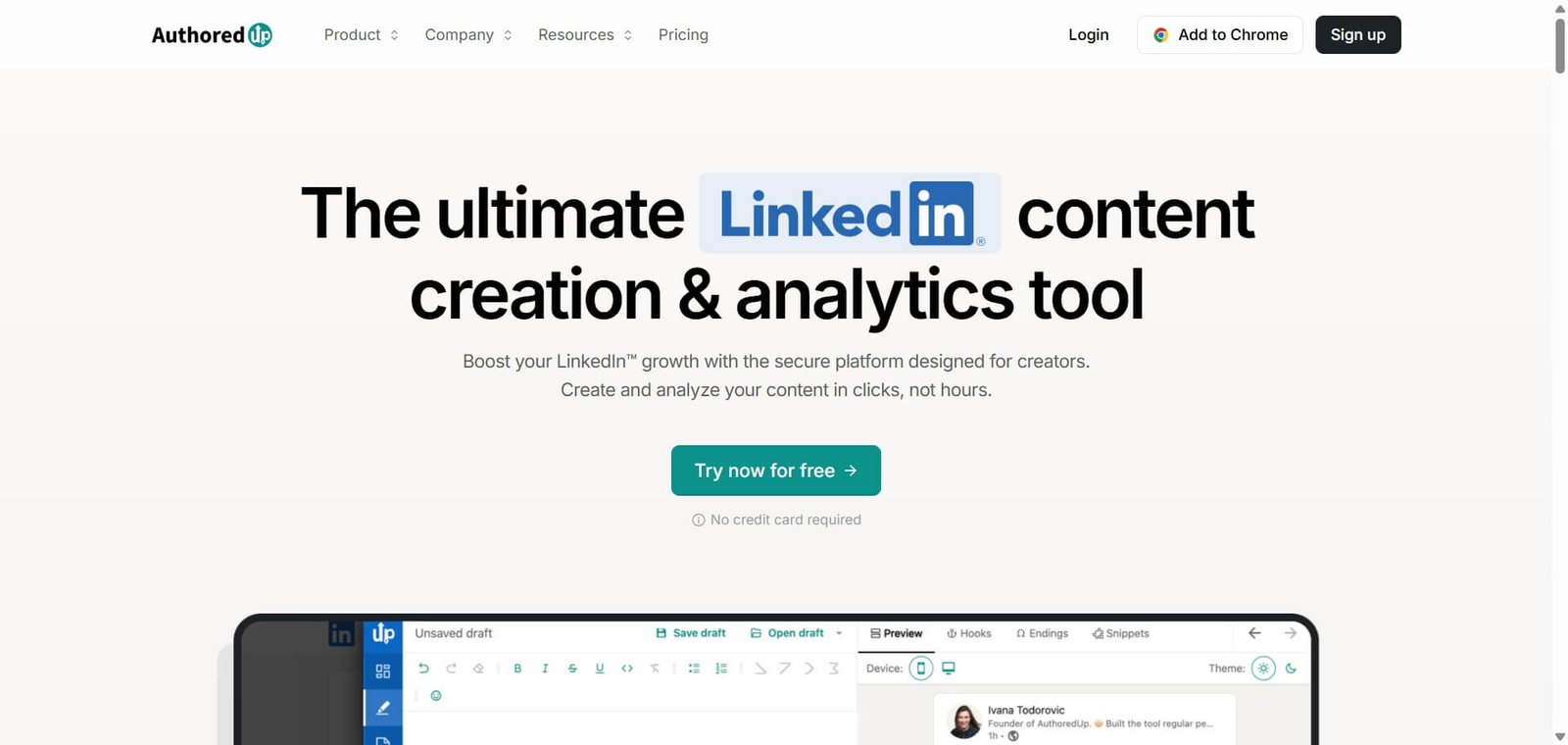
LinkedIn’s native post editor is remarkably limited for professional content creators — no formatting preview before posting, no analytics deeper than basic engagement metrics, no content library for reusing what works, and no scheduling without a third-party tool. AuthoredUp fills every one of these gaps through a Chrome extension that enhances the LinkedIn interface directly — adding a rich text editor with formatting options, post templates, performance analytics broken down to hook and content level, content scheduling, and AI writing assistance — without requiring creators to leave LinkedIn or switch between multiple tools.

Quick Summary

AuthoredUp is an AI-powered LinkedIn content editor and analytics platform delivered as a Chrome extension — providing a rich text editor with text formatting inside LinkedIn, post templates, hook and content analytics, scheduling, drafts library, content repurposing tools, and AI writing assistance — for LinkedIn creators, thought leaders, and personal brands who want to improve content quality and measure what drives engagement.

Is it worth using? Yes for LinkedIn creators, executives building personal brands, and B2B marketers who post regularly on LinkedIn and want a richer editing experience, deeper analytics than LinkedIn provides natively, and AI assistance for improving their content.
Who should use it? LinkedIn content creators, consultants and coaches building personal brands, B2B marketers, and executives who post consistently on LinkedIn and want to improve content quality and understand performance at a level LinkedIn’s native analytics do not provide.
Who should avoid it? Social media managers who need multi-platform scheduling and analytics across LinkedIn, Twitter, Instagram, and others — tools like Taplio or Metricool cover the full social stack.

Verdict Summary

Best for

  • Individual LinkedIn creators and executives who post consistently and want an enhanced editing experience directly inside LinkedIn — rich text formatting, preview mode, and template access without switching between applications
  • Consultants and coaches building personal brands who want to understand which content formats, hooks, and topics drive the most engagement — AuthoredUp’s analytics break down performance at hook and content body level, not just total engagement
  • B2B marketers who want to analyse top-performing content from their industry and competitors on LinkedIn — the content analysis tools surface what works in specific niches for informed content strategy

Not for

  • Social media managers who need multi-platform scheduling and analytics beyond LinkedIn — Taplio, Buffer, or Metricool serve this broader need
  • Teams who need collaborative content workflows with multiple authors, approval processes, and brand governance
  • LinkedIn users who post only occasionally and do not need enhanced analytics or template libraries for their volume

Rating
⭐⭐⭐⭐ 4.2 / 5

What Is AuthoredUp?

AuthoredUp is a Chrome extension that enhances the LinkedIn interface for content creators — adding tools that LinkedIn does not provide natively but that serious LinkedIn creators need for improving content quality and measuring performance. Its approach differs from standalone LinkedIn scheduling tools by embedding directly inside LinkedIn rather than requiring creators to work in a separate application, matching the workflow of creators who already spend time in LinkedIn and want to improve it rather than replace it.

The platform’s analytics depth is its primary differentiator from simpler LinkedIn tools — breaking down content performance at the hook level (first one to three lines), body level, and call-to-action level — providing actionable data about which specific elements of a post drive impressions, engagement, and dwell time rather than reporting only total likes and comments.

How AuthoredUp Works

  • Install the Chrome extension. AuthoredUp installs as a Chrome extension and activates automatically inside LinkedIn — adding its tools to the LinkedIn interface without requiring a separate application.
  • Write with the enhanced editor. Use AuthoredUp’s rich text editor inside LinkedIn to add bold text, line breaks, special characters, and formatting that LinkedIn’s native editor does not support — with a real preview of how the formatted post will appear before publishing.
  • Use templates and hooks. Browse AuthoredUp’s post template library and hook formulas — selecting proven structures for different content formats and customising them for the specific topic.
  • Get AI writing assistance. Use AI features to improve drafts, generate hook variations, expand bullet points into full paragraphs, or adjust tone and style — with AI assistance working on the content in context rather than requiring a separate ChatGPT tab.
  • Schedule and draft. Schedule posts for optimal times based on audience analytics, save drafts for future refinement, and maintain a content library of past posts for repurposing.
  • Analyse performance. Review detailed analytics breaking down each post’s performance at hook, body, and CTA level — understanding which elements drove impressions and engagement across the content library.
  • Research competitor content. Use AuthoredUp’s content research tools to analyse top-performing posts from creators in specific niches — identifying content formats, topics, and hook patterns that resonate with a target audience.

Key Features

  • Chrome extension enhancing LinkedIn directly — no separate application required
  • Rich text editor with bold, formatting, special characters, and post preview before publishing
  • Post template library with proven content structures for different LinkedIn formats
  • Hook and body analytics breaking post performance down below total engagement metrics
  • AI writing assistance for hook generation, content expansion, and tone adjustment
  • Content scheduling for optimal posting times based on audience analytics
  • Drafts library for saving and refining content before publishing
  • Content repurposing tools for adapting past posts into new formats
  • Competitor and niche content research for informed content strategy
  • Post library maintaining a searchable archive of all published content

Real-World Use Cases

  • Executive personal brand building: A SaaS founder uses AuthoredUp to post three times per week on LinkedIn — the template library provides proven structures for thought leadership posts, the hook analytics show which opening lines are driving the most impressions, and the scheduling feature ensures consistent posting without manual timing monitoring.
  • Content performance analysis: A B2B consultant uses AuthoredUp’s hook analytics to analyse six months of their posts — discovering that questions in the first line consistently outperform statements by 40% in early impressions, and that posts published Tuesday morning reach twice the audience of Friday afternoon posts. They adjust their content strategy based on data rather than intuition.
  • Niche content research: A marketing consultant uses AuthoredUp’s content research tools to analyse the top 50 posts in their niche over the past 90 days — identifying that case study posts with specific numbers in the hook consistently outperform general advice posts, informing their content calendar for the next quarter.
  • Enhanced formatting: A LinkedIn creator uses AuthoredUp’s rich text editor to create visually formatted posts with bold section headers, clean line breaks, and special characters that stand out in the LinkedIn feed — the formatting preview prevents the formatting surprises that LinkedIn’s native editor produces when posts publish differently than they appear in the draft.

Pros and Cons

ProsCons
Embedded directly inside LinkedIn — no application switching for creators who already work in LinkedInChrome extension only — no Firefox, Safari, or mobile LinkedIn app support
Hook and body analytics provide more actionable content intelligence than LinkedIn’s native metricsLimited to LinkedIn — not suitable for social media managers who need multi-platform tools
Rich text editor with preview solves the formatting surprise problem LinkedIn’s native editor createsTeam collaboration features less developed than enterprise social media management tools
Template and hook library reduces blank-page friction for consistent content creatorsFree plan restricts access to analytics and AI features that justify the platform
Content research tools provide competitor and niche intelligence for strategy developmentLess scheduling depth than dedicated scheduling platforms for teams managing multiple LinkedIn accounts

Pricing & Plans

Free — $0
  • Basic editor enhancement
  • Limited templates
  • Basic analytics
  • Community support
Creator — From $9.99/month
  • Full analytics including hook and body breakdown
  • Complete template library
  • AI writing assistance
  • Scheduling
  • Drafts library
  • Priority support
Team — Custom pricing
  • Multiple LinkedIn accounts
  • Team access and management
  • Advanced analytics
  • Priority support

Verify current plan details and pricing at authoredup.com.

Best Alternatives & Comparisons

  • Taplio — Better for LinkedIn growth with AI content generation, lead sourcing, and CRM for relationship management alongside editing
  • Shield Analytics — Better for deep LinkedIn analytics specifically with detailed audience and content intelligence
  • Buffer — Better for multi-platform social media scheduling alongside LinkedIn, less LinkedIn-specific analytics depth
  • Metricool — Better for multi-platform social media management with LinkedIn alongside other channels

Frequently Asked Questions (FAQ)

What is AuthoredUp?

AuthoredUp is an AI-powered LinkedIn content editor and analytics platform delivered as a Chrome extension — providing a rich text editor inside LinkedIn, post templates, hook and body analytics, scheduling, content research, and AI writing assistance for LinkedIn creators and personal brands.

Is AuthoredUp free?

Yes — AuthoredUp offers a free plan with basic editor enhancement. The Creator plan provides full analytics, templates, AI writing assistance, and scheduling from approximately $9.99/month.

Does AuthoredUp work on mobile LinkedIn?

No — AuthoredUp is a Chrome browser extension and works in the LinkedIn web interface on desktop. LinkedIn mobile app users need to use the native LinkedIn editor on mobile.

What makes AuthoredUp's analytics different from LinkedIn's native analytics?

AuthoredUp breaks down performance at the hook level — the first one to three lines — and the content body level separately, providing insight into which specific elements of a post drive impressions and engagement. LinkedIn’s native analytics report only aggregate engagement metrics without this element-level breakdown.

Does AuthoredUp help with AI writing?

Yes — AuthoredUp includes AI writing assistance for generating hook variations, expanding bullet points, adjusting tone, and improving drafts — working within the LinkedIn context rather than requiring a separate AI writing tool.

How does AuthoredUp compare to Taplio?

AuthoredUp focuses on enhancing the LinkedIn writing and analytics experience through a Chrome extension embedded in LinkedIn. Taplio provides AI content generation, LinkedIn lead sourcing, relationship CRM, and broader LinkedIn growth tools as a standalone application. AuthoredUp for creators who want enhanced writing and analytics inside LinkedIn. Taplio for creators who want AI-generated content alongside lead generation and relationship management.

Final Recommendation

AuthoredUp is the most practical LinkedIn content tool for individual creators, executives, and consultants who post regularly on LinkedIn and want to improve their editing experience, understand their content performance at depth, and use AI assistance — all without leaving LinkedIn or adding another standalone application to their workflow. The embedded Chrome extension approach, hook-level analytics, and template library address the specific limitations that hold back serious LinkedIn content creators from the platform’s native tools, at pricing that makes consistent improvement accessible.

Next steps

Feature your app on AI tools for free

Subscribe to our Newsletter

Stay up-to-date with the latest AI Apps and cutting-edge AI news.

Trending Categories