itirupati.com AI Tools

Fetcher AI

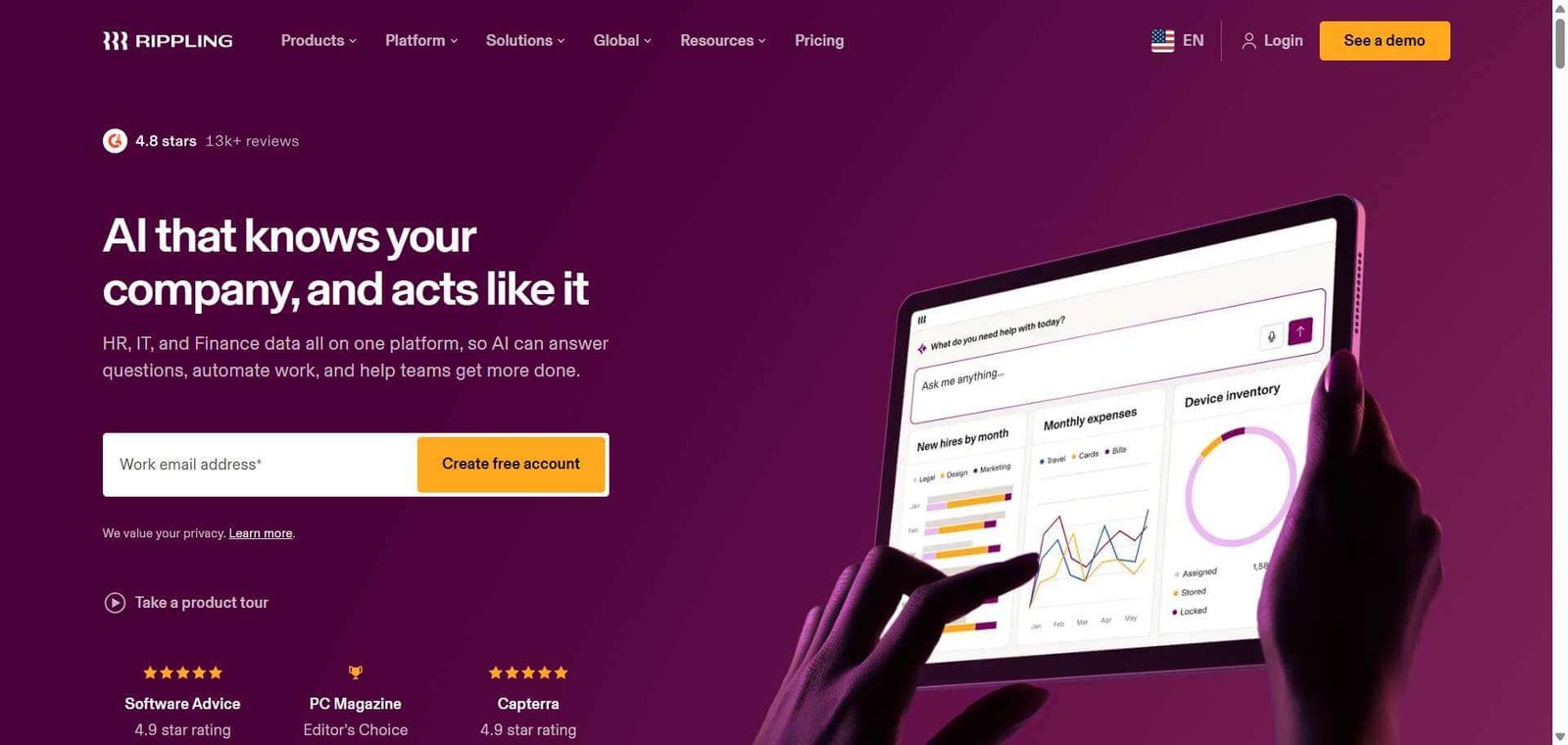
One employee record for HR, IT, and finance — and Rippling AI that answers your people and spending questions in plain language.

Rippling Review: The Platform That Unifies HR, IT, and Finance Around One Employee Record — Now With AI That Queries All Three

The problem Rippling was built to solve is fragmentation — most growing companies run payroll in one tool, benefits in another, device management in a third, app access in a fourth, and expense management in a fifth. Each transition in the employee lifecycle — a new hire, a role change, a departure — requires manual updates in each system. Rippling replaces all of them with one unified employee record that automatically propagates changes across payroll, benefits, device configuration, app permissions, and finance whenever anything about the employee changes. Rippling AI, launched in March 2026, adds a natural language interface that allows anyone from the HR leader to the CFO to query the unified data across all three domains — HR, IT, and finance — without navigating separate dashboards or running custom reports.

Quick Summary

Rippling is an all-in-one HR, IT, and finance platform that unifies the full employee lifecycle — payroll, benefits, time and attendance, device management, app access, and spend management — on a single employee record with automated cross-system synchronisation, Rippling AI for natural language data queries, 650 plus integrations, and SOC 2 Type II plus ISO 27001 compliance, starting from $8/employee/month.

Is it worth using? Yes for technology-forward, fast-growing companies from 50 to 1,000 plus employees who want to consolidate HR, IT, and finance tooling into one platform with genuine automation across all three — and who want AI to query the unified data without custom reporting.
Who should use it? HR leaders, finance teams, IT administrators, and operations leaders at growing technology companies and distributed workforces who want unified employee data automation with deep integration capability.
Who should avoid it? Very small businesses under 20 employees where simpler tools like Gusto or BambooHR provide better value per dollar without the complexity and cost of a multi-module platform.

Verdict: Detailed Summary

Best for

  • Fast-growing technology companies scaling from 50 to 500 employees who want HR, IT, and finance to stop operating as separate silos — Rippling’s unified employee record is the most complete implementation of this vision in the market
  • Distributed and remote teams hiring globally who want payroll, device management, and EOR in one system rather than separate vendors for each country
  • Operations and People leaders who want Rippling AI to answer real-time questions — “how many employees are in each location?”, “which devices are unmanaged?”, “what is our total spend by department this quarter?” — without waiting for a report

Not for

  • Very small businesses under 20 employees where Gusto or BambooHR deliver better value per dollar without the platform complexity
  • Companies whose primary need is payroll only — Rippling’s required Unity Platform foundation means you cannot buy payroll without the base HR layer
  • Organisations on tight budgets where $35 to $50 plus per employee per month all-in is disproportionate to their needs

Rating
⭐⭐⭐⭐ 4.4 / 5

What Is Rippling?

Rippling is a workforce management platform founded in 2016 by Parker Conrad — built on the premise that every HR, IT, and finance system should derive from a single employee record rather than maintaining separate data in separate tools. When a new hire is onboarded in Rippling, the platform simultaneously sets up payroll, enrolls them in benefits, ships and configures their laptop, grants access to every required app, and adds them to expense management — from one action in one system.

Rippling AI, introduced in March 2026, adds a natural language interface to this unified data layer — allowing users to query the combined HR, IT, and finance data in plain English with permission-aware responses that ensure employees only see data they are authorised to access. The platform holds SOC 1, SOC 2, SOC 3, ISO 27001, ISO 27018, ISO 42001, and CSA STAR Level 2 certifications — the broadest published security stack among HR platform competitors.

How Rippling Works

  • Set up the Unity Platform foundation. The Rippling Unity Platform is the required base — the single employee data layer that all other modules connect to. Every employee record is created once and flows automatically to all connected modules.
  • Add modules as needed. Layer HR modules — payroll, benefits, time and attendance, performance management — alongside IT modules — device management, app management — and finance modules — expense management, corporate cards — based on the organisation’s needs.
  • Automation handles lifecycle changes. When an employee changes roles, gets promoted, or departs, Rippling’s automated workflows propagate the change across all connected systems — updating payroll, adjusting app permissions, configuring device access, and triggering offboarding steps without manual updates in each tool.
  • Rippling AI answers data questions. Ask Rippling AI in natural language — “which employees in the engineering team are on PTO this week?”, “what is our average salary by department?”, “which devices need security patches?” — and receive permission-aware answers from the unified data layer.
  • Manage global workforce. Use Rippling’s global payroll and Employer of Record services for international employees — covering payroll compliance, benefits, and device management across international markets from the same platform used for domestic employees.
  • Integrate with existing tools. Connect Rippling to 650 plus apps through the App Shop — Salesforce, Slack, QuickBooks, NetSuite, Xero, Greenhouse, and others — maintaining existing workflows while unifying the underlying employee data.

Key Features

  • Unified employee record automatically synchronising changes across payroll, benefits, IT, and finance
  • Rippling AI (March 2026) for natural language querying across HR, IT, and finance data with permission-aware responses
  • Payroll for US and global employees with automated tax filing and compliance
  • Benefits administration with automated enrollment and lifecycle management
  • Device management including procurement, configuration, shipping, and remote wipe in 30 plus countries
  • App management for 650 plus application integrations with automatic provisioning and deprovisioning
  • Expense management and corporate cards for spend control
  • Global Employer of Record and international payroll for distributed global workforces
  • Rippling Automated Compliance for SOC 2 readiness using existing platform data
  • SOC 1, SOC 2, SOC 3, ISO 27001, ISO 27018, ISO 42001, and CSA STAR Level 2 certification

Real-World Use Cases

  • Automated onboarding: A 200-person technology company uses Rippling to onboard 10 new hires per month — each new hire’s information is entered once, and Rippling simultaneously processes payroll setup, benefits enrollment, ships and configures their MacBook, grants Slack, Notion, GitHub, and Salesforce access, and adds them to expense management. The IT and HR teams save approximately 3 hours per new hire compared to their previous multi-system process.
  • Rippling AI data queries: A CFO asks Rippling AI “what is our total headcount cost by department for Q2 including benefits and equipment?” — the AI queries the unified HR and finance data and returns the answer with department breakdown in under 30 seconds, replacing a report that previously required the finance analyst to pull data from three separate systems.
  • Global team management: A startup with employees in the US, UK, and Singapore uses Rippling for all three markets — US payroll, UK global payroll, Singapore EOR, and device management in all three countries run from one platform without a separate vendor for each region.
  • Automated offboarding: An employee is terminated and their manager initiates the offboarding workflow in Rippling — within minutes, payroll is finalised, benefits are terminated, all apps are deprovisioned, and the device receives a remote wipe command. The process that previously took three people and two days takes one person and ten minutes.

Pros and Cons

ProsCons
Most complete unification of HR, IT, and finance on one employee record — the best implementation of this vision in the marketOpaque modular pricing — the $8/employee/month headline represents only the base layer; most full deployments run $35 to $50 plus per employee per month
Rippling AI queries unified data across all three domains in natural language — genuinely more useful than single-domain AIImplementation fees of $1,500 to $20,000 plus for full-stack multi-module setups add to first-year cost
Automated cross-system propagation eliminates manual updates across tools for every lifecycle changeRequired Unity Platform base means you cannot buy payroll without the HR foundation layer
Broadest published security certification stack among HR platform competitorsVery small businesses under 20 employees pay more per employee than simpler alternatives without the full platform value
650 plus integrations cover every major business application without custom developmentRippling vs Deel litigation and DOJ investigation into Deel adds vendor landscape uncertainty — Rippling is the plaintiff

Pricing & Plans

Rippling uses modular, per-employee pricing. Only two modules have published pricing — all others require custom quotes:

Core HR — $8/employee/month + $35/month base fee
  • Unified employee records and basic HR workflows
  • Required foundation for all other modules
Payroll — $35/employee/month (estimated)
  • US payroll, tax filing, and compliance
  • Layered on top of Core HR
IT Management — $8 to $20/employee/month (estimated)
  • Device management, app provisioning, and MDM
Finance Modules — $10 to $15/employee/month (estimated)
  • Expense management, corporate cards, and spend management

Typical all-in cost: $25 to $50 plus per employee per month for HR plus payroll plus IT plus finance across a 50 to 200 person company.

Contact rippling.com for a custom quote. Demo available — no free trial.

Best Alternatives & Comparisons

  • Gusto — Better for small businesses under 50 employees wanting simple payroll at transparent pricing without multi-module complexity
  • BambooHR — Better for mid-size companies wanting strong HR core features without IT and finance integration complexity
  • Deel — Better for global hiring breadth and contractor-first EOR — note ongoing Rippling vs Deel litigation
  • Workday — Better for large enterprise HR with the deepest HR analytics and compliance features at higher cost

Frequently Asked Questions (FAQ)

What is Rippling?

Rippling is an all-in-one HR, IT, and finance platform that unifies payroll, benefits, device management, app access, and spend management on a single employee record — with Rippling AI for natural language data queries and 650 plus integrations, starting from $8/employee/month.

How much does Rippling cost?

Core HR starts at $8/employee/month plus a $35/month base fee. Payroll adds approximately $35/employee/month. Most full HR plus IT plus finance deployments run $35 to $50 plus per employee per month. All pricing beyond Core HR requires a custom quote.

What is Rippling AI?

Rippling AI, launched March 2026, is a natural language interface that allows users to query the unified HR, IT, and finance data in plain English — asking questions about headcount, spend, devices, and compliance with permission-aware responses that ensure data access matches each user’s role.

Does Rippling handle global payroll?

Yes — Rippling provides US payroll, international payroll, and Employer of Record services covering multiple countries. Device management also covers shipping and configuration in 30 plus countries from the same platform.

Is there a free trial for Rippling?

No — Rippling offers a demo instead of a free trial. A sales call is required to receive pricing and begin onboarding.

How does Rippling compare to Gusto?

Gusto is simpler, cheaper, and payroll-first — ideal for small businesses under 50 employees who need payroll with transparent pricing. Rippling is more powerful and more configurable, unifying HR with IT and finance with strong global payroll, but costs significantly more. Gusto for simplicity and price. Rippling for automation, scale, and international reach.

Final Recommendation

Rippling is the most ambitious and most complete unified HR, IT, and finance platform available for fast-growing technology companies — and the combination of unified employee record automation, Rippling AI for cross-domain natural language queries, device management, and global payroll in one system creates genuine operational leverage that fragmented multi-tool environments cannot match. For any HR, IT, or finance leader who is spending meaningful time manually synchronising employee changes across separate systems, Rippling’s unified approach converts that manual overhead into automated workflows that scale without proportional headcount growth.

Next steps

Feature your app on AI tools for free

Subscribe to our Newsletter

Stay up-to-date with the latest AI Apps and cutting-edge AI news.

Trending Categories