
Photoroom
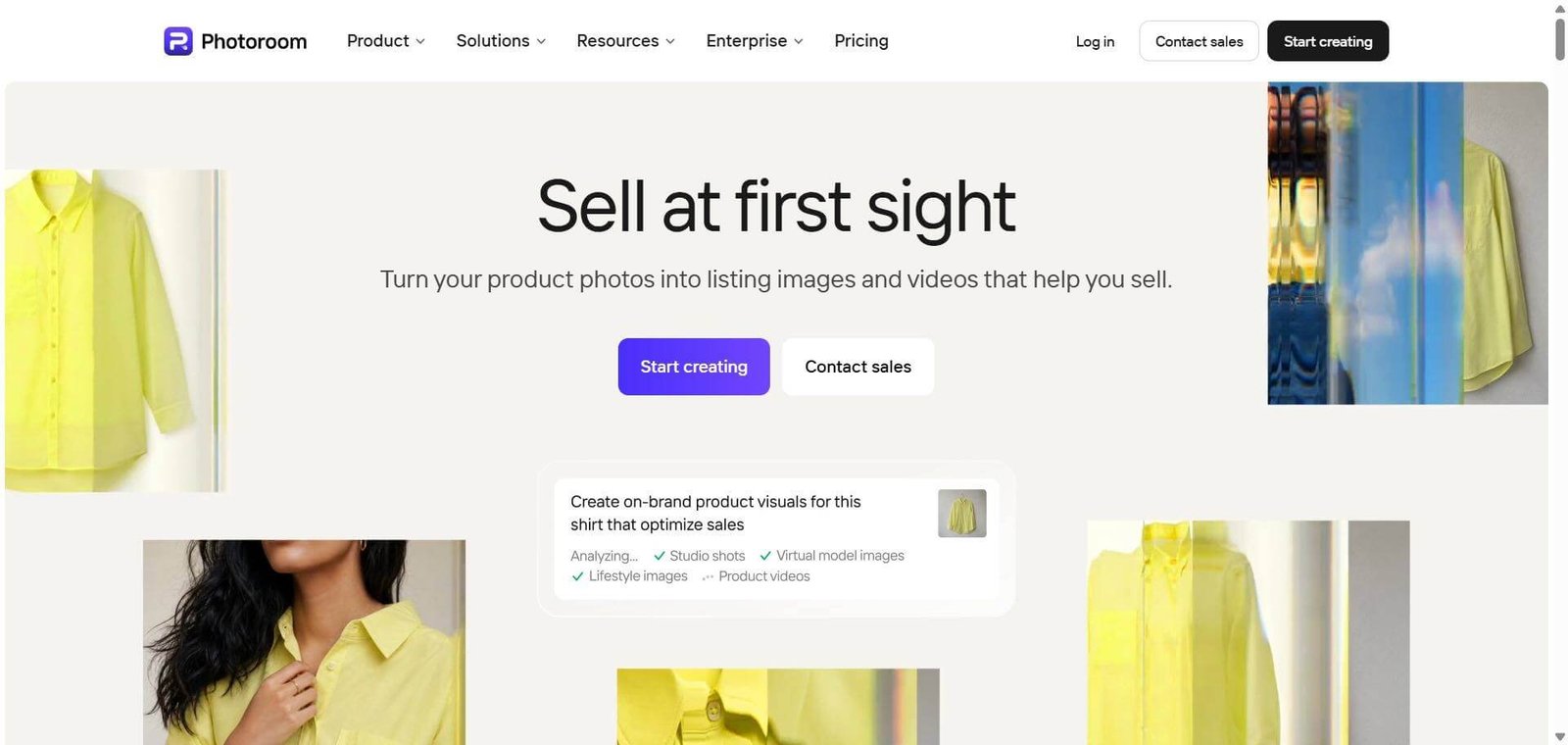
Photoroom is an AI-powered product photography and image editing platform for e-commerce businesses. Remove backgrounds, generate product scenes, edit catalogs in bulk and create branded visuals.
Photoroom AI Review: Features, Pricing, Pros, Cons and Alternatives
Photoroom is an AI-powered product photography and image editing platform designed for e-commerce sellers, online retailers, marketers and creative teams. It helps users remove image backgrounds, generate product scenes, create AI fashion model images and prepare product visuals for different sales channels.
The platform is particularly useful for businesses that regularly update product catalogs and need consistent images without arranging a separate photoshoot for every product. Its capabilities extend beyond individual image editing to batch processing, API integrations and enterprise catalog workflows.
Is Photoroom worth using? It is worth considering if product photography and repetitive image editing take up a significant part of your business operations. However, businesses that need precise manual retouching or complete creative control may prefer professional editing software such as Adobe Photoshop.
Photoroom Review
Product photography can become expensive and time-consuming when an online store manages hundreds or thousands of products. Every image may require background removal, lighting adjustments, resizing and formatting before it is ready for publication.
Photoroom addresses this workflow through AI-assisted editing and product image generation. Rather than functioning as a general-purpose design application, it concentrates on preparing commercial product visuals for online stores, marketplaces, advertisements and social media.
Its appeal is not limited to individual sellers. The platform also offers batch processing, reusable brand assets and API integrations for businesses that need to standardize image production across larger catalogs.
The important consideration is whether its generated images retain enough product accuracy for commercial use. A visually attractive image is not necessarily a reliable product photograph if the AI changes packaging, colors, textures or proportions.
Below is a detailed review for e-commerce sellers, marketers, product teams and businesses evaluating Photoroom for their visual production workflows.
Verdict Summary
Photoroom is a capable AI product photography platform for businesses that want to reduce repetitive image editing and create consistent product visuals.
Its strongest capabilities are background removal, AI product photography, product staging and batch processing. The availability of API access and enterprise workflows also makes it relevant to businesses that need more than an individual photo editor.
However, generated images still require quality checks. Businesses selling products where exact colors, labels, materials and dimensions matter should not publish AI-generated visuals without comparing them against the original product.
Best for:
E-commerce businesses managing product catalogs.
Marketplace sellers preparing listing photographs.
Fashion and beauty brands creating product imagery.
Marketing agencies producing branded visual content.
Developers automating product image processing.
Not for:
Professional photographers requiring advanced manual retouching.
Designers looking for a complete Photoshop replacement.
Businesses requiring guaranteed visual accuracy without human review.
Occasional users who only need basic image resizing or editing.
Pricing: The India pricing displayed in the supplied pricing information starts at ₹299/month for Pro, ₹779/month for Max and ₹8,590/month for Ultra. Annual billing offers lower monthly equivalents.
Editorial rating: 8.7/10. Reviewer-assigned assessment based on product specialization, feature coverage, pricing structure, automation capabilities and practical limitations
What Is Photoroom?
Photoroom is an AI-powered visual production platform that helps businesses create and edit product photographs for online selling. It combines image editing, background generation, product staging, fashion imagery and catalog automation in one platform.
Traditional product photography involves several separate activities. A business photographs an item, removes the background, adjusts the lighting, adds shadows and prepares different image formats for its website and marketplaces.
Photoroom automates several of these tasks, allowing businesses to work with existing product photographs instead of starting every visual project with a new photoshoot.
Its capabilities can be divided into four main areas.
1. AI product photography
Users can upload existing product photographs and generate studio-style or lifestyle visuals. This is particularly relevant to businesses that need different creative treatments for product pages, advertising campaigns and social media.
2. Image editing and enhancement
Background removal, object removal, AI shadows, image expansion and product enhancement help prepare photographs for commercial use. These tools are useful when the original photograph needs cleanup before publication.
3. Brand consistency
The Brand Library and templates allow teams to reuse brand colors, logos, fonts and layouts. This helps businesses maintain a consistent appearance across different products and marketing channels.
4. Catalog automation
Batch processing and API integrations support larger image production workflows. Instead of editing every photograph individually, businesses can apply repeatable operations to multiple images.
Photoroom also offers capabilities for enterprise customers, including catalog-specific Visual Agents, quality assurance workflows, dedicated support and service-level agreements.
This makes it different from general AI image generators. Its primary purpose is not unrestricted creative image generation. It focuses on preparing commercial product visuals that businesses can use within their existing sales and marketing operations.
How Photoroom Works
Photoroom follows a relatively straightforward process, although the available workflow depends on whether someone is editing a single photograph or managing a larger catalog.
A typical product image workflow involves:
Upload a photograph: Start with an existing product image from a computer or supported device.
Choose an editing tool: Select background removal, AI product photography, product staging, image enhancement or another available operation.
Generate the result: Apply the selected changes and review the generated image.
Make corrections: Check the product’s shape, colors, textures, labels and proportions. Adjust the image if necessary.
Apply brand elements: Use saved logos, colors, fonts and templates to maintain consistency.
Export or automate: Download the finished image or use batch processing and API integrations for larger production workflows.
For individual sellers, the web and mobile editing experience may be sufficient. Larger businesses can explore batch editing and API integrations to reduce repetitive work.
One important distinction is that automation does not eliminate quality control. Businesses still need to inspect the final photographs before using them in product listings.
Key Features
Photoroom offers several image production tools, but five capabilities deserve particular attention because they directly affect e-commerce workflows.
1. AI Product Photography
Photoroom’s AI Product Photography tool generates new product visuals using an existing product photograph.
This is useful for businesses that need multiple visual presentations without organizing a separate studio session for every campaign. For example, a skincare seller can use an existing product photograph to create different promotional scenes for a website, seasonal campaign or social media advertisement.
The important question is product fidelity.
The original photograph should remain the reference for packaging, product shape, color and visible branding. AI-generated backgrounds may look attractive, but users should check whether the product itself has been altered during generation.
Businesses should pay particular attention to reflective packaging, transparent bottles, jewelry and products with intricate labels. These items can be harder to represent accurately in generated scenes.
Best suited for: Online retailers, beauty brands, product marketers and businesses creating multiple advertising visuals.
2. Background Remover
Background removal is one of Photoroom’s central capabilities. It automatically separates the main subject from the surrounding background, allowing users to create transparent images, clean product cutouts and white-background photographs.
For marketplace sellers, this can reduce the time spent manually selecting objects and removing unwanted backgrounds.
However, image quality depends on the source photograph. Loose hair, transparent packaging, glass objects, thin wires and products with similar foreground and background colors can require additional cleanup.
The background remover is most valuable when processing large numbers of straightforward product photographs. For complex images requiring pixel-level control, professional editing software may still be necessary.
Best suited for: Marketplace sellers, small online stores, photographers and catalog management teams.
3. Product Staging and AI Backgrounds
Product Staging helps users place products into generated environments rather than presenting every item against a plain background.
This is useful when a business wants lifestyle imagery without arranging a physical setting for every product. A furniture seller, for example, can create contextual room scenes, while a beauty brand can generate product compositions suited to its campaign style.
The practical limitation is that generated environments must not misrepresent the actual product.
Pay attention to shadows, reflections, product scale and the relationship between the product and its surroundings. These details influence whether the photograph looks credible.
For product specifications, technical details and marketplace compliance, actual product photographs should remain available alongside generated creative images.
Best suited for: Lifestyle brands, furniture retailers, beauty businesses and advertising teams.
4. Batch Processing and Bulk Editing
Batch processing is one of Photoroom’s more commercially important capabilities for larger businesses.
Instead of applying the same operation repeatedly to individual photographs, teams can process multiple product images using selected settings. The official product information describes batch editing for large catalogs, with workflows that can handle thousands of images.
Supported operations include background removal, resizing, positioning and other image preparation tasks.
This is especially useful when a marketplace or retailer needs consistent image formatting across many product listings.
However, businesses should distinguish between processing capacity and quality assurance. A batch operation can standardize the output format, but it does not guarantee that every photograph is visually correct.
Before automating an entire catalog, test representative products, including difficult images and different packaging types.
Best suited for: Large online stores, marketplaces, catalog operations teams and agencies.
5. AI Fashion Models and Virtual Try-On
Photoroom offers AI Fashion Models and virtual try-on capabilities for businesses that need model-based clothing imagery.
These tools can help fashion retailers create additional product presentations without arranging a separate model photoshoot for every garment.
The main consideration is whether the generated representation accurately reflects the garment. Fit, fabric texture, patterns, stitching, colors and garment proportions should be checked before publication.
For products where fit and appearance directly influence purchasing decisions, actual garment photographs remain important.
Best suited for: Clothing brands, fashion marketplaces, online apparel sellers and fashion marketing teams.
6. Product Video Generator
Converts product imagery into video content and provides templates for advertisements and product pages. Availability depends on the subscription.
Real-World Use Cases
Photoroom’s value depends on how frequently a business creates product images and how much of that work can be standardized.
For e-commerce sellers: Prepare product listing photographs, remove backgrounds and create consistent visuals for online stores.
For fashion brands: Create additional model-based product presentations and catalog imagery.
For beauty businesses: Generate promotional product scenes and prepare branded photographs for websites and advertisements.
For marketing agencies: Produce campaign assets using reusable templates and brand elements across multiple clients.
For marketplace operators: Standardize seller-submitted images and automate repetitive catalog preparation.
For food and delivery businesses: Prepare menu photographs and promotional visuals for ordering platforms.
For developers: Integrate background removal and image generation into existing applications through API access.
For enterprise teams: Manage large image collections using batch processing, centralized workflows and catalog-specific quality controls.
A useful distinction is the volume of images being produced. A seller processing 20 photographs a month may only need basic editing. A marketplace managing thousands of product listings has a stronger reason to evaluate batch processing and API automation.
Pros and Cons
Photoroom’s advantages are concentrated around product image preparation and repeatable editing workflows. Its limitations become more important when businesses need detailed creative control or strict product accuracy.
| Pros | Cons |
|---|---|
| Background removal simplifies routine product image preparation | Complex outlines, hair and transparent objects may need cleanup |
| AI product photography creates alternative product scenes | Generated visuals require checks for changes to product details |
| Batch processing supports large image collections | High-volume users need to monitor export and credit allowances |
| Brand Library helps maintain consistent visual presentation | Advanced capabilities depend on subscription level |
| API supports automated catalog workflows | Integrations may require developer resources |
| Image and video tools are available in one platform | It does not replace advanced manual editing software |
The business implications are more important than the feature list itself.
A small seller may benefit immediately from background removal, while an enterprise retailer should evaluate the cost of API integration, quality assurance and monthly usage. Businesses selling products with transparent packaging or highly detailed finishes should also test image accuracy before making Photoroom part of their production pipeline.
Pricing & Plans
Photoroom uses a subscription-based pricing structure with different AI credit allowances, export limits and feature access.
The following figures are from the India pricing information supplied for this review. Prices may change, and the actual amount displayed at checkout should take priority.
| Plan | Monthly billing | Monthly equivalent with annual billing | AI credits | Exports |
|---|---|---|---|---|
| Pro | ₹299 | ₹167 | 3,000 | 1,000 |
| Max | ₹779 | ₹334 | 7,000 | 3,000 |
| Ultra | ₹8,590 | ₹7,159 | 75,000 | 10,000 |
| Enterprise | Custom | Custom | Custom | Custom |
Pro – ₹299/month or ₹167/month with annual billing.
Includes 3,000 AI credits and 1,000 exports, along with core editing tools, AI backgrounds and AI fashion models.
Pro is suitable for individual sellers and smaller businesses that primarily need product image editing and preparation. It does not include the Video Generator.
Max – ₹779/month or ₹334/month with annual billing.
Includes 7,000 AI credits and 3,000 exports, with video generation and additional capabilities.
Max is a more relevant option for businesses that regularly create both product photographs and video advertisements. Shopify integration is also listed as an included feature on the official plan comparison.
Ultra – ₹8,590/month or ₹7,159/month with annual billing.
Includes 75,000 AI credits and 10,000 exports, alongside video generation and 4K image and video capabilities.
Ultra is aimed at businesses with heavier production requirements. However, the price difference from Max is substantial, so businesses should calculate their expected monthly usage before upgrading.
Enterprise – Custom pricing.
The Enterprise offering includes catalog-specific Visual Agents, an Enterprise Guarantee add-on, adjustable AI shadows, dedicated onboarding, support, enterprise SLAs and security features such as SOC 2 Type 2 and SSO.
It is more relevant to marketplaces and large organizations that need customized image production and governance workflows.
Is There a Free Plan?
The supplied pricing information does not establish the current terms of a permanent free commercial plan. Photoroom also offers free-trial options on selected subscriptions.
Check the official pricing page and account-specific terms before assuming that free access includes commercial usage, unrestricted exports or advanced AI features.
Which Photoroom Plan Should You Choose?
Small sellers: Start by evaluating Pro if your primary requirement is image editing.
Growing e-commerce stores: Consider Max if you need video generation and more exports.
High-volume businesses: Evaluate Ultra against your expected AI generation and export requirements.
Large marketplaces: Contact Enterprise sales if you require customized workflows and service-level commitments.
Consider a practical example. A small seller producing 100 usable product images each month does not necessarily need the same subscription as an agency processing 2,000 images.
Best Alternatives & Comparisons
Photoroom is not the only option for AI product photography. Several platforms offer overlapping capabilities, but their strengths differ.
| Tool | Primary strength | Best suited for | Why choose it over Photoroom? |
|---|---|---|---|
| Pixelcut | AI product image editing | Small online stores | Worth comparing for accessible product editing and mobile workflows |
| Canva | Graphic design and marketing content | Marketing teams | Better for broader design, presentations, social media and branded content |
| Adobe Photoshop | Advanced image manipulation | Professional designers | Offers greater manual control over complex image editing |
| Claid.ai | Product photography and image automation | E-commerce operations | Offers product-focused editing, generation and API workflows |
| Pebblely | AI-generated product scenes | Lifestyle product visuals | Focuses on creating different marketing scenes from product photographs |
Photoroom vs Pixelcut
Pixelcut is a close alternative for businesses looking for AI product photography, background removal and image editing.
Both tools address the needs of online sellers. Photoroom is particularly worth considering when brand consistency, catalog production and enterprise automation are important. Pixelcut is worth comparing for its accessible product editing workflow and mobile experience.
Photoroom vs Canva
Canva is better suited to businesses that need a broader design platform. Its visual tools extend to social media content, presentations, documents, videos and marketing materials.
Photoroom is more specialized in product image preparation. Choose Canva when the wider marketing design workflow matters more than catalog-focused image processing.
Photoroom vs Adobe Photoshop
Photoshop is a better fit for designers who need detailed control over layers, selections, masks, compositing and retouching.
Photoroom is more convenient for repetitive product image operations that do not require extensive manual editing. The two can also complement each other, with Photoroom handling routine preparation and Photoshop handling complex corrections.
Photoroom vs Claid.ai
Claid.ai is worth evaluating for businesses that need product photography, background generation, enhancement and API-based workflows.
Its focus on product and fashion imagery makes it relevant to catalog teams and businesses automating visual production. Compare both platforms using the same source photographs and check how well each preserves labels, materials and product details.
Photoroom vs Pebblely
Pebblely focuses on generating product photography and lifestyle scenes from existing product photographs.
It is worth considering when the main requirement is creating alternative product environments for websites, advertising and social media. Photoroom offers a broader combination of background removal, editing, batch processing and enterprise capabilities.
Who Should Use Photoroom?
Photoroom is a good fit for businesses where product image production is a recurring operational requirement.
Consider it if you:
Manage an online store with frequently updated product listings.
Need to remove backgrounds from multiple photographs.
Create promotional product scenes regularly.
Want reusable brand templates for catalog images.
Need batch editing or API-based image processing.
Produce fashion, beauty, furniture or marketplace imagery.
It is particularly relevant when reducing repetitive editing work is more important than having complete manual control over every image.
Who Should Avoid Photoroom?
Photoroom may not be the right choice if your work depends heavily on detailed manual retouching or exact visual reproduction.
Consider alternatives if you:
Need advanced layer-based editing and compositing.
Work with highly detailed photographs requiring pixel-level corrections.
Only edit a few images occasionally.
Cannot accept any changes to product appearance in generated visuals.
Need a complete graphic design and publishing platform rather than a product photography tool.
In these situations, Photoshop, Canva or a traditional photography workflow may be more appropriate.
Frequently Asked Questions (FAQ)
Yes. Photoroom is worth considering for businesses that regularly prepare product listing images, remove backgrounds and create promotional visuals. Its batch processing and automation capabilities are particularly relevant to larger catalogs.
Photoroom provides free access or trial options depending on the current offer and product. Paid subscriptions provide additional AI credits, exports and advanced features. Check the latest terms before relying on free access for commercial work.
Yes. Its AI Product Photography and Product Staging tools generate new scenes using existing product images. However, users should check generated images for changes to product colors, packaging, textures and proportions.
Yes. Photoroom offers batch processing for editing larger product image collections. It is useful for businesses that need consistent background removal, resizing and image preparation across multiple listings.
Pixelcut, Canva, Adobe Photoshop, Claid.ai and Pebblely are relevant alternatives. Pixelcut suits similar product editing workflows, Canva supports broader design, Photoshop provides advanced manual control, Claid.ai focuses on product image workflows, and Pebblely specializes in AI-generated product scenes.
User Ratings and Reviews
G2: 4.3/5 ⭐⭐⭐⭐☆ (20 reviews).
Product Hunt: 4.6/5 ⭐⭐⭐⭐⭐ (18 reviews).
Capterra: 4.6/5 ⭐⭐⭐⭐⭐ (17 reviews).
Apple App Store: 4.7/5 ⭐⭐⭐⭐⭐ (36K ratings).
Google Play: 4.7/5 ⭐⭐⭐⭐⭐ (approximately 4.04 million reviews).
What do users appreciate?
Feedback on G2 and Capterra highlights the convenience of background removal, ease of use and the ability to create product visuals without advanced editing knowledge.
Some reviewers also appreciate batch editing and AI-generated backgrounds because these features reduce repetitive work.
What do users criticize?
Recurring concerns include background removal difficulties with complex outlines, occasional inaccuracies in generated images, subscription restrictions and limited manual editing controls compared with Photoshop.
Final Recommendation
Photoroom is best suited for e-commerce businesses, online sellers and creative teams that produce product photographs regularly and want to reduce repetitive editing work.
Its strongest capabilities are background removal, AI product photography, product staging and batch processing. API access and enterprise workflows also give larger businesses a reason to consider it beyond individual image editing.
However, it is not a universal replacement for professional photography or advanced editing software. Product accuracy remains important, particularly for clothing, cosmetics, electronics and products with detailed packaging.
For broader graphic design, consider Canva. For advanced image manipulation, Adobe Photoshop is a stronger option. For alternative product photography workflows, compare Pixelcut, Claid.ai and Pebblely.
Our recommendation: Test Photoroom with a representative selection of your actual product photographs before choosing an annual subscription. Evaluate the number of usable images, required corrections and total monthly cost.
Visit the official Photoroom website to explore its tools and plans, or compare other AI image editing tools on itirupati.com.