itirupati.com AI Tools

Hemingway Editor

Paste your writing — Hemingway shows exactly what is making it hard to read, in seconds, for free.

Hemingway Editor Review: The Writing Tool That Teaches You to Write Clearly by Showing You Exactly Where You Went Wrong

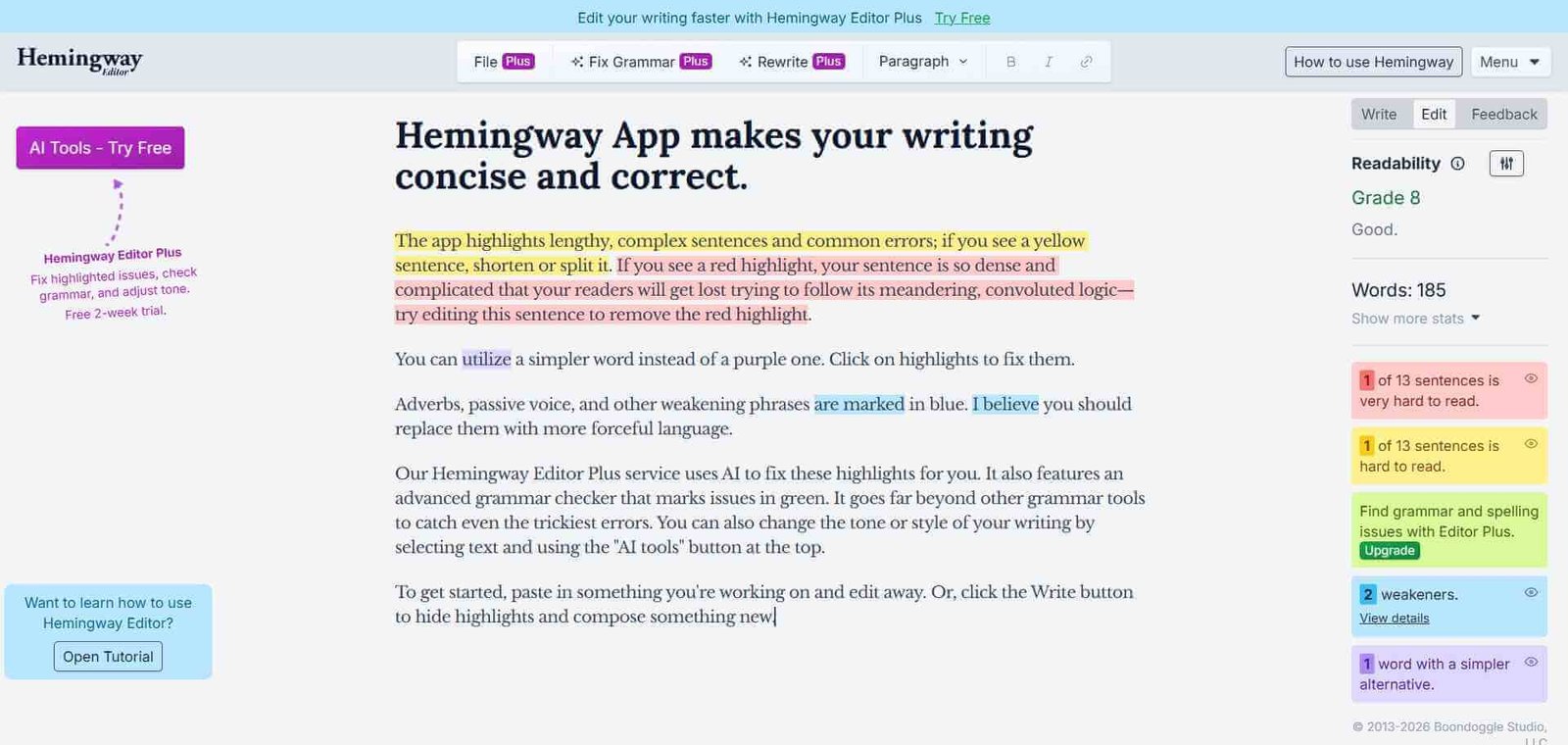
Most writing feedback is subjective — editors say your prose is “dense” or “unclear” without showing you precisely which sentence is causing the problem. Hemingway Editor removes the subjectivity entirely. Paste your text in and every problem is highlighted in a specific colour: yellow for long sentences that could be shortened, red for very complex sentences that will lose readers, blue for adverbs that weaken the writing, green for passive voice constructions, and purple for words that have simpler alternatives. The readability grade tells you which education level can comfortably read the piece. No opinions — just the specific problems, shown exactly where they are.

Quick summary

Hemingway Editor is a free web-based writing clarity tool that colour-codes problematic writing elements — long sentences, very complex sentences, passive voice, adverbs, and unnecessarily complex words — and assigns a readability grade, with a $19.99 one-time desktop app adding AI polishing, tone adjustment, shortening features through OpenAI integration, offline access, and direct publishing to WordPress and Medium.

Is it worth using? Yes for bloggers, content creators, business writers, and students who want to make their writing clearer and more readable without the complexity or cost of full grammar suites — the free web version alone is genuinely useful for any writer.
Who should use it? Bloggers, content marketers, business professionals, students, and any writer who wants immediate visual feedback on writing clarity and readability without learning a complex tool.
Who should avoid it? Writers who need comprehensive grammar correction, plagiarism detection, or deep style coaching across long-form fiction — ProWritingAid or Grammarly serve these more complex needs.

Verdict Summary

Best for

  • Bloggers and content creators who produce short to medium-form writing for general audiences and want to ensure their content is clear and accessible at a reading level appropriate for their audience — Hemingway’s readability grade makes this immediately visible
  • Business professionals who write emails, reports, and communications and want a quick pass that removes passive voice, unnecessary adverbs, and convoluted sentence structures before sending
  • Writers who want to learn better writing habits through consistent use — Hemingway’s colour-coded feedback teaches the patterns of clear writing through repeated exposure to exactly which choices are weakening each piece

Not for

  • Fiction writers who need deep narrative craft feedback — ProWritingAid’s Chapter Critique and Manuscript Analysis serve long-form fiction needs that Hemingway’s readability focus does not address
  • Writers who need grammar correction, spell check, and plagiarism detection as primary requirements — Grammarly is more appropriate for comprehensive grammar-first writing assistance
  • Writers who work primarily in Google Docs or Microsoft Word and want integrated in-document AI feedback without leaving the writing environment

Rating
⭐⭐⭐⭐ 4.2 / 5

What Is Hemingway Editor?

Hemingway Editor is a web and desktop writing clarity tool named after Ernest Hemingway’s direct, unadorned writing style. It was created by brothers Adam and Ben Long and has become one of the most widely referenced writing tools in content marketing and blogging — partly because its free web version provides genuinely useful immediate feedback with zero friction, and partly because its feedback philosophy is simple enough to explain in a single paragraph: shorter sentences, fewer adverbs, active voice, simpler words.

The desktop app adds OpenAI-powered AI features — text polishing, tone adjustment, and content shortening — alongside offline access and direct publishing to WordPress and Medium, making it a meaningful upgrade for writers who work regularly enough to justify the one-time $19.99 purchase.

How Hemingway Editor Works

  • Paste or type your text. Navigate to hemingwayapp.com and paste your writing directly into the editor, or type in it directly. The analysis runs in real time — no submit button, no waiting.
  • Read the colour-coded feedback. Every highlighted passage corresponds to a specific issue — yellow for long sentences, red for very complex sentences, blue for adverbs, green for passive voice, purple for words with simpler alternatives. The sidebar shows counts for each category and the overall readability grade.
  • Aim for the target grade. Hemingway recommends a Grade 9 or lower for most general-audience content — readable by a broad audience without dumbing down. The grade updates in real time as you edit.
  • Edit directly in Hemingway. Switch to Write mode for distraction-free drafting, then return to Edit mode for analysis. Edit directly in the tool and watch the highlights clear as problems are resolved.
  • Use AI features on the desktop app. The desktop app’s AI Rewrite feature, powered by OpenAI, can polish selected text, adjust tone, or shorten passages — AI assistance applied specifically to the clarity-focused Hemingway workflow.
  • Publish directly. The desktop app publishes directly to WordPress and Medium from within Hemingway, eliminating the copy-paste step for writers who publish to these platforms.

Key Features

  • Colour-coded sentence analysis — yellow (long), red (very complex), blue (adverb), green (passive voice), purple (complex word)
  • Real-time readability grade based on Automated Readability Index
  • Sidebar summary showing count of each issue type and overall grade
  • Write mode for distraction-free drafting alongside Edit mode for analysis
  • AI Rewrite, tone adjustment, and shortening via OpenAI integration on the desktop app
  • Direct publishing to WordPress and Medium on the desktop app
  • Export to PDF, Word, HTML, and Markdown on the desktop app
  • Offline access on the desktop app — works without internet connection
  • Team plan for organisations needing shared access with team management features
  • Completely free web version — no registration required

Real-World Use Cases

  • Blog post review: A content marketer pastes a 1,200-word blog post into Hemingway before publishing — the editor immediately highlights seven red sentences that are too complex for a general audience and flags fifteen passive voice instances. The writer rewrites the flagged passages, reducing the readability grade from 13 to 8 in 15 minutes.
  • Email clarity: A sales professional pastes a follow-up email into Hemingway before sending — the editor highlights three sentences using passive voice and two with unnecessary adverbs. The rewrites make the message more direct and confident before it reaches the prospect.
  • Student essay revision: A university student uses Hemingway to review their essay draft — the Grade 14 readability score tells them the writing is more complex than necessary, and the highlighted long sentences guide specific revision targets rather than vague feedback to “write more clearly.”
  • Social media caption writing: A brand manager uses Hemingway to ensure all social captions read at Grade 6 or below — the tool’s immediate visual feedback trains the habit of shorter, more direct sentences that perform better on social platforms.

Pros and Cons

ProsCons
Completely free web version — no registration, no time limit, immediate accessNo grammar correction or spell check — works alongside, not instead of, a grammar tool
Real-time colour-coded feedback makes problems immediately visible without interpretationNo plagiarism detection, citation tools, or research integration
$19.99 one-time desktop purchase is one of the best-value writing tool investments availableAI features (polishing, tone, shortening) limited to desktop app — not available in free web version
Teaches clear writing habits through repeated use — writers internalise the patterns over timeLimited for long-form fiction — narrative craft, pacing, and dialogue analysis not covered
AI polishing and tone adjustment add a meaningful AI layer to the core readability analysisNo browser extension — requires leaving the writing environment to use the tool

Pricing & Plans

Free — $0
  • Full web access at hemingwayapp.com
  • Real-time colour-coded analysis
  • Readability grade
  • Write and Edit modes
  • No registration required
Desktop App — $19.99 one-time purchase
  • All free web features offline
  • AI Rewrite, tone adjustment, and shortening via OpenAI
  • Export to PDF, Word, HTML, Markdown
  • Direct publish to WordPress and Medium
  • One-time purchase — no ongoing subscription
Editor Plus — $10/month
  • AI grammar and tone tools
  • Advanced sentence correction beyond readability
  • Priority support
Team 10K Plan — $12.50/user/month ($150/user billed annually)
  • 10,000 AI sentences per user per month
  • Team management features
  • 14-day free trial available

Best Alternatives & Comparisons

  • ProWritingAid — Better for 25 plus analytical reports, long-form fiction craft feedback, and Scrivener integration
  • Grammarly — Better for comprehensive grammar correction and tone detection across all writing environments
  • Wordtune — Better for AI-powered sentence rewriting and paraphrasing alongside clarity feedback

Frequently Asked Questions (FAQ)

What is Hemingway Editor?

Hemingway Editor is a free writing clarity tool that colour-codes complex sentences, passive voice, adverbs, and unnecessarily complex words — assigning a readability grade in real time with a $19.99 one-time desktop app adding AI polishing, offline access, and WordPress publishing.

Is Hemingway Editor free?

Yes — the full web version at hemingwayapp.com is completely free with no registration required. The desktop app is a one-time $19.99 purchase. Monthly plans are available for teams needing AI features and team management.

What do the colours mean in Hemingway Editor?

Yellow highlights long sentences that could be shortened. Red highlights very complex sentences that may lose readers. Blue highlights adverbs. Green highlights passive voice. Purple highlights words that have simpler alternatives.

Does Hemingway Editor fix grammar?

No — Hemingway Editor focuses specifically on writing clarity and readability, not grammar correction. It should be used alongside a grammar tool like Grammarly rather than as a replacement for one.

What readability grade should I target?

Hemingway recommends Grade 9 or below for most general-audience content — readable by a broad audience without being simplistic. The appropriate target depends on the audience — technical or academic writing may warrant a higher grade.

How does Hemingway compare to Grammarly?

Hemingway focuses exclusively on writing clarity — readability grade, sentence complexity, passive voice, and adverbs. Grammarly focuses primarily on grammar, spelling, and punctuation with tone detection added. They serve complementary purposes — many writers use both, running Grammarly first for grammar and Hemingway for clarity.

Final Recommendation

Hemingway Editor is the most honest writing feedback tool available — it shows exactly which sentences are the problem and exactly why, without opinion or subjectivity. The free web version delivers this value with zero friction, making it the first tool any writer who has been told their writing is “too dense” or “hard to follow” should open immediately. The $19.99 desktop app adds AI polishing that makes the tool meaningfully more powerful for regular users. For any writer who wants to learn clearer writing habits rather than just fix individual errors, Hemingway’s repeated visual feedback is how that learning happens.

Next steps

Feature your app on AI tools for free

Subscribe to our Newsletter

Stay up-to-date with the latest AI Apps and cutting-edge AI news.

Trending Categories