Sunsama Review: The Daily Planner That Treats Your Time Like It Actually Matters
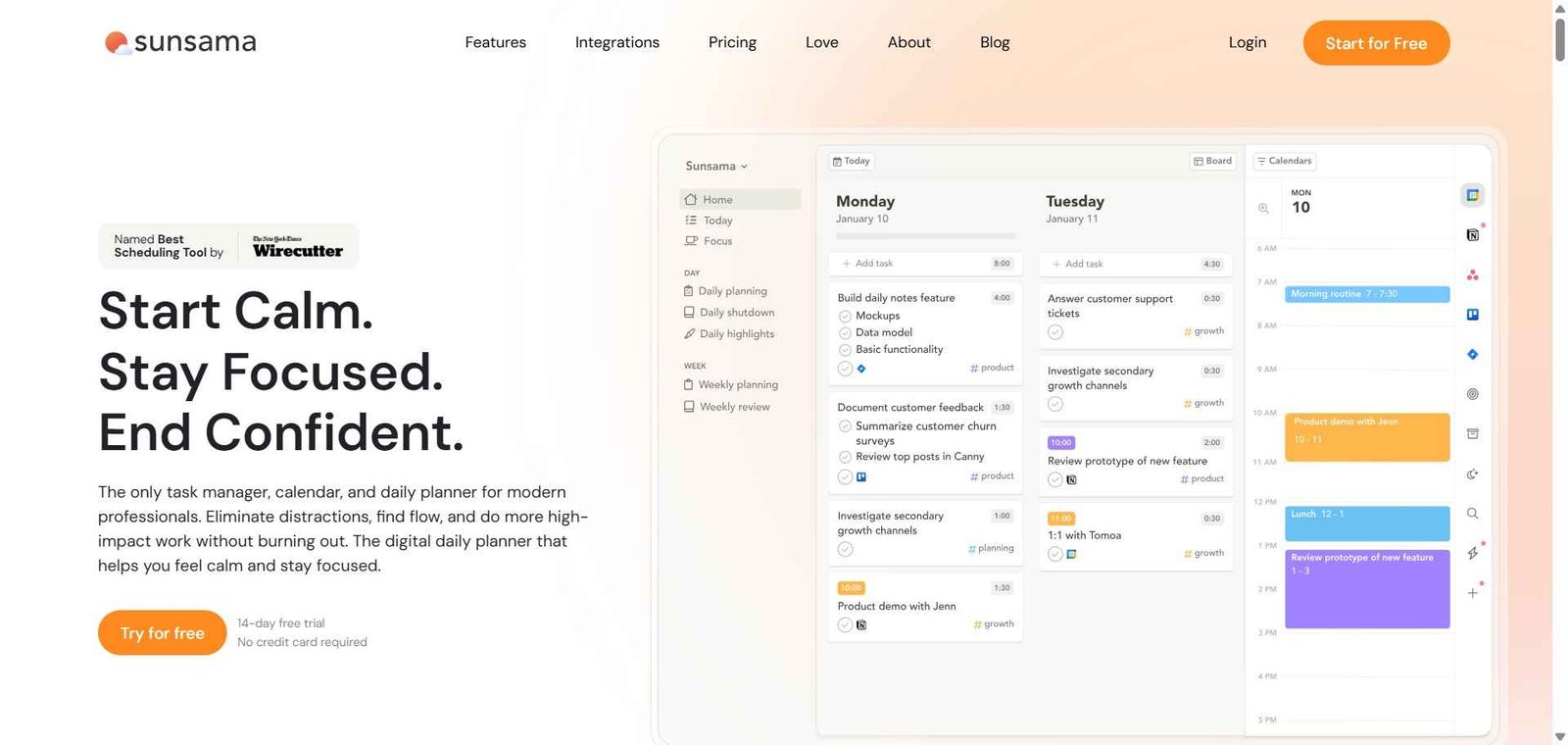
Most productivity systems optimise for capturing more tasks. Sunsama optimises for something more valuable — helping professionals decide what is actually worth doing today, schedule it realistically, and stop working at a reasonable time. Its guided daily planning ritual pulls tasks from every connected tool, asks how long each will realistically take, timeboxes them into the calendar, and at the end of the day walks through a shutdown review so tomorrow starts with clarity rather than a mental backlog. Wirecutter named Sunsama its top pick for AI scheduling apps — a recognition of its distinctive approach in a crowded category.
Quick Summary
Sunsama is a daily planner that integrates tasks from multiple productivity tools into guided planning and shutdown rituals for busy professionals — pulling work from 15 plus integrations into one focused daily view with AI-guided scheduling and timeboxing.
Is it worth using? Yes for knowledge workers, remote professionals, and founders who want a deliberate, structured daily planning practice that connects their tasks, calendar, and goals in one calm interface. Who should use it? Remote workers, founders, consultants, and knowledge workers who feel overwhelmed by fragmented task lists across multiple tools and want a daily planning system that creates focus and prevents overcommitment. Who should avoid it? Teams who need collaborative project management alongside individual planning, or users who want fully automated AI scheduling without a guided daily ritual.
Verdict Summary
Best for
Knowledge workers who want a daily planning practice that is structured and intentional rather than reactive — reviewing what needs to happen, committing to a realistic amount, and closing the day with a review
Professionals who use multiple tools — Asana, Jira, Notion, Slack, Gmail — and want one unified view of all their work for daily planning without switching between them
Remote workers and founders who struggle with work-life boundaries and want a tool that actively encourages a reasonable workday end time
Not for
Teams who need shared project management and collaborative task workflows
Users who want fully automated AI scheduling that builds the schedule without a manual daily ritual
People with simple task management needs who do not need 15 plus integration pull
Rating ⭐⭐⭐⭐ 4.5 / 5
What Is Sunsama?
Sunsama addresses work chaos created by tool fragmentation, prioritisation paralysis, and burnout risk from chronic overwork. Rather than replacing existing productivity tools, it positions itself as an orchestration layer that consolidates workflows from Asana, Trello, Jira, Slack, and calendar platforms into a single daily planning interface.
Sunsama centres on three daily rituals: morning planning with capacity visualisation, focused work execution with Pomodoro timers, and end-of-day shutdown reviews. The AI layer guides the planning ritual — suggesting how to allocate time based on task priorities, flagging when the day is overcommitted, and generating a focused daily plan from the chaos of incoming tasks across every connected tool.
How Sunsama Works
Connect your tools. Link Google Calendar, Outlook, Asana, Trello, Jira, ClickUp, Notion, Slack, Gmail, Monday.com, and other tools. All tasks and events pull into Sunsama automatically.
Run your morning ritual. Sunsama guides you through the daily planning ritual — reviewing yesterday’s incomplete tasks, pulling tasks from connected tools, estimating how long each will take, and timeboxing them into the day’s calendar.
Commit to a realistic day. Sunsama shows your capacity versus your commitments — flagging when you have overloaded the day and prompting you to push tasks to tomorrow or a future date.
Work through your plan. Execute tasks from the Sunsama daily view — with Pomodoro timers, task notes, and focus mode keeping attention on the current task.
Run your shutdown ritual. At the end of the day, Sunsama walks through a shutdown review — logging what was completed, reflecting on the day, and setting up tomorrow’s starting point so the workday ends deliberately rather than fading into the evening.
Review weekly objectives. Connect daily tasks to weekly objectives to maintain alignment between day-to-day execution and longer-term goals.
Key Features
Guided daily planning ritual with capacity visualisation and time estimation
Pulls tasks from 15 plus integrations including Google Calendar, Outlook, Asana, Trello, Jira, ClickUp, Notion, Monday.com, Slack, and Microsoft Teams
Timeboxing — scheduling tasks directly in a weekly calendar alongside meetings
AI-guided daily planning assistant for realistic time allocation
End-of-day shutdown ritual for deliberate workday closure
Weekly objectives connected to daily tasks for goal alignment
Pomodoro timer and focus mode for execution
Automatic task rollover for incomplete work with reflection prompts
Cross-platform — web, Mac desktop, iOS, and Android
Real-World Use Cases
Fragmented tool problem: A product manager uses five different tools — Jira, Notion, Slack, Gmail, and Google Calendar — and was spending 30 minutes each morning manually pulling their day together. Sunsama pulls everything into one planning view, reducing morning planning to a focused 10-minute ritual.
Overcommitment prevention: A consultant used to commit to unrealistic daily task lists and end every day feeling behind. Sunsama’s capacity visualisation shows the committed hours against available time — prompting realistic planning that means the day’s commitments are actually achievable.
Remote work boundaries: A remote founder used to work until late every evening because there was no natural signal to stop. Sunsama’s shutdown ritual creates a deliberate daily closure — reviewing what was done, setting up tomorrow, and closing the workday intentionally.
Weekly goal alignment: A startup team lead uses Sunsama’s weekly objectives to ensure their daily tasks connect to the week’s priorities — preventing the common pattern of staying busy without making progress on what actually matters.
Guided planning ritual creates genuine daily focus rather than reactive task management
No free plan — 14-day trial only before committing
15 plus integrations pull all work into one planning view without manual entry
Fully automated AI scheduling users may prefer Motion or Reclaim AI
Shutdown ritual actively supports work-life balance in a way most tools ignore
No team collaboration features — designed for individual use
Capacity visualisation prevents the chronic overcommitment that causes burnout
Some users find the ritual structure feels slow on busy days
Wirecutter’s top pick for AI scheduling apps— third-party validation of quality
Pricing is higher than simpler task managers without the planning layer
Pricing & Plans
Monthly — $20/month
All features
15 plus integrations
AI planning assistant
All platforms
14-day free trial
Annual — $16/month (billed annually)
All Monthly features
20% saving versus monthly
Best Alternatives & Comparisons
Motion — Better for fully automatic AI task scheduling without a manual daily ritual
Reclaim AI — Better for automated focus time defence with a free plan, less structured daily ritual
Todoist — Better for simple affordable task management without planning rituals
Akiflow — Similar daily planner concept with task consolidation, different interface approach
Frequently Asked Questions (FAQ)
What is Sunsama?
Sunsama is a daily planning and productivity app designed to help professionals manage their tasks and calendar in a calm, focused, and intentional way — pulling tasks from 15 plus tools into guided daily planning and shutdown rituals.
Is Sunsama free?
Sunsama does not offer a free plan. A 14-day free trial is available without a credit card. Paid plans start at $16/month billed annually.
How does Sunsama pull tasks from other tools?
Sunsama integrates with 15 plus tools including Google Calendar, Outlook, Asana, Trello, Jira, ClickUp, Notion, Monday.com, Slack, and Microsoft Teams — pulling tasks and events from each into one unified daily planning interface.
What is Sunsama's daily planning ritual?
The morning planning ritual prompts users to review yesterday’s progress, set weekly objectives, and realistically estimate capacity — then timebox chosen tasks into the calendar for a committed, realistic daily plan.
What is the shutdown ritual in Sunsama?
The shutdown ritual is a guided end-of-day review — reflecting on what was completed, rolling incomplete tasks to future days with notes, and setting up tomorrow’s starting point so the workday ends deliberately rather than trailing off without closure.
How does Sunsama compare to Motion?
Motion fully automates task scheduling into the calendar without user direction. Sunsama uses a guided daily ritual where the user actively chooses and commits to each day’s plan with AI assistance. Sunsama is better for professionals who want intentional, deliberate planning with ownership over each day’s commitments. Motion is better for those who want the AI to handle all scheduling decisions automatically.
Final Recommendation
Sunsama is the most intentional AI daily planner available for professionals who want their planning practice to reflect how much they value their time. The guided morning ritual, shutdown review, and capacity visualisation create a planning system that consistently produces calmer, more focused, and more realistic workdays than reactive task management ever delivers. Being named Wirecutter’s top pick for AI scheduling apps is a meaningful signal for any professional evaluating this category seriously. For anyone who ends too many days feeling behind despite working hard, Sunsama’s structured approach to daily planning addresses the root cause.