Tango
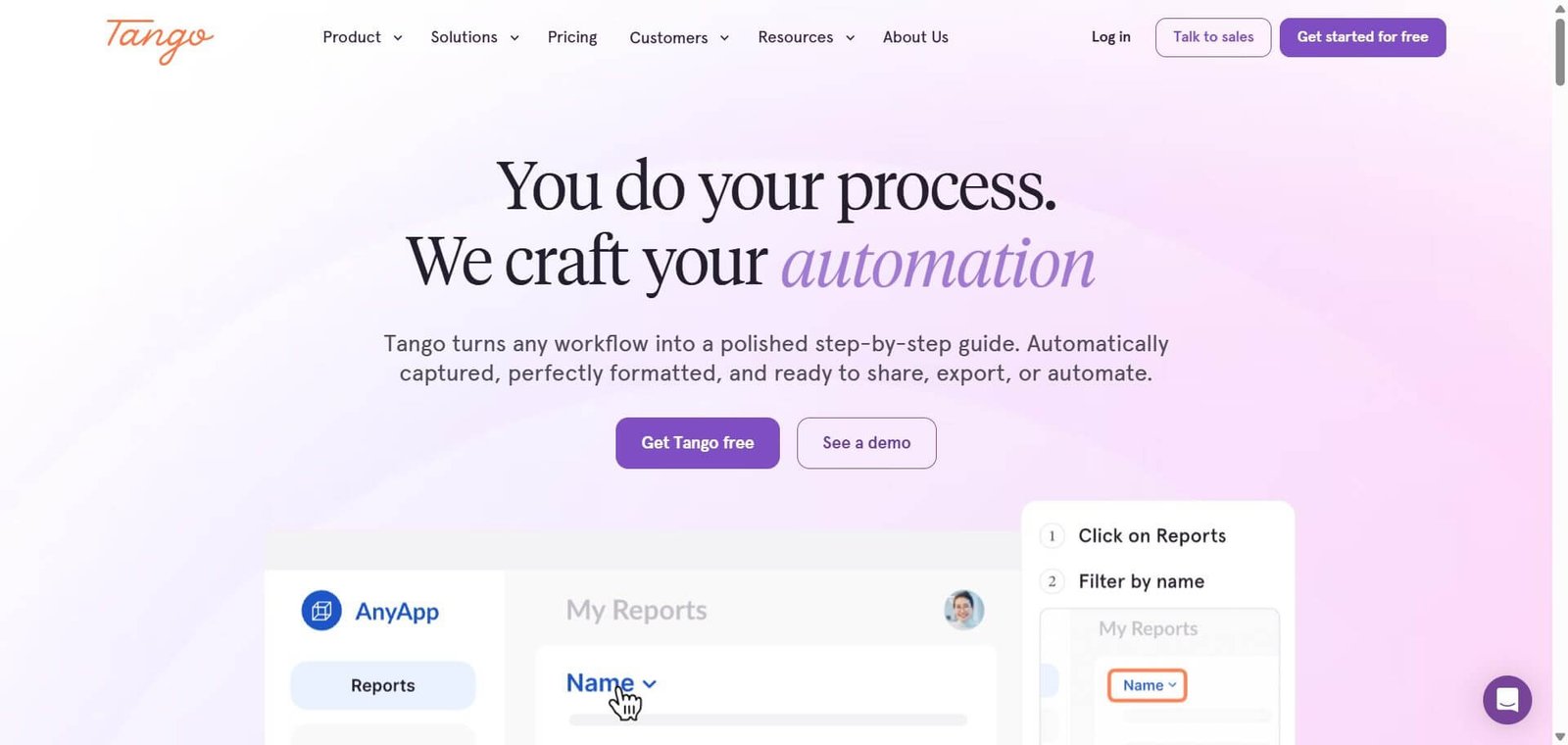
Do a process once, get a polished step-by-step guide automatically — 3 million plus guides created by teams at Salesforce, Gusto, and Rockwell Automation.
Tango Review: The AI Process Documentation Tool That Solves the SOP Problem for Operations Teams
Standard operating procedures have a lifecycle problem — they are created when a process is new, become outdated as tools and workflows evolve, and are eventually ignored because nobody has time to maintain them. Tango attacks this from the creation end of the lifecycle: instead of requiring someone to manually write and screenshot a process, Tango’s Click-to-Create captures the workflow automatically as it is performed, generates a polished step-by-step guide with annotated screenshots in seconds, and makes that guide available in-app for real-time guidance exactly where the work happens. The result is process documentation that can be created in minutes rather than hours — making it realistic to keep documentation current rather than perpetually aspirational.
Quick Summary
Tango is a workflow documentation and digital adoption platform that automatically captures processes as you perform them and generates polished step-by-step guides with screenshots and annotations — with Guide Me in-app real-time guidance, Nuggets for embedding tips and links in-tool, over 3 million guides created, and trusted by Salesforce, Gusto, and Rockwell Automation. Free plan available with Pro at $26/user/month and Enterprise at custom pricing.
Is it worth using? Yes for IT, operations, enablement, and customer success teams at growing companies who need to create, maintain, and deliver process documentation faster than traditional SOP authoring allows — Tango’s capture-and-generate workflow is the fastest path from undocumented process to usable guide.
Who should use it? IT teams documenting software workflows, operations managers standardising internal processes, enablement teams creating onboarding guides, and customer success teams building product training — at companies from 15 to enterprise scale where process documentation creates measurable operational value.
Who should avoid it? Teams whose documentation needs are primarily long-form written process narrative rather than step-by-step software workflow capture — Tango’s core strength is web application and software process documentation rather than general knowledge management.
Verdict Summary
Best for
- IT and operations teams at growing companies who are answering the same “how do I do X in this software?” questions repeatedly — Tango captures the answer once and makes it available in-app as a Guide Me walkthrough without the questioner ever needing to ask again
- Enablement and training teams building onboarding programmes who want to create polished step-by-step product guides in minutes rather than hours — the speed difference between Tango and manual screenshot-and-write documentation is hours per guide at scale
- Enterprise teams doing software rollouts and change management who need in-app guidance that meets employees in the tool rather than in a separate knowledge base they have to think to check
Not for
- Teams whose primary knowledge management need is wiki-style written documentation and long-form process narrative — Notion, Confluence, or Guru serve this need better
- Organisations needing deep approvals, governance workflows, and compliance auditing around their documentation — the Enterprise plan adds some of this but Tango is primarily a creation and delivery tool
- Solo users or very small teams where the per-user pricing at Pro tier makes the investment disproportionate to the volume of guides needed
Rating
⭐⭐⭐⭐ 4.3 / 5
What Is Tango?
Tango is a workflow documentation and digital adoption platform — built around the insight that the biggest problem with process documentation is not that people do not want it, but that creating and maintaining it is too time-consuming relative to every other operational priority. Its Click-to-Create feature records actions as the user performs a workflow, automatically capturing screenshots of each step, generating annotations and descriptions, and producing a finished guide without any manual authoring.
The platform goes beyond documentation generation with its digital adoption layer — Guide Me in-app walkthroughs that guide users through processes step-by-step inside the actual software they are using, and Tango Nuggets that let teams pin guides, tips, and links directly in the applications where employees work. Together these features make Tango a process documentation platform that delivers guidance at the point of need rather than requiring employees to find and read documentation before they start.
How Tango Works
- Install the Tango Chrome extension. Tango’s browser extension activates Click-to-Create mode — click the extension to begin capturing any web-based workflow you are performing.
- Perform the process as normal. Work through the process — clicking buttons, entering data, navigating screens — as you normally would. Tango captures each action with a screenshot automatically without interrupting the workflow.
- Guide generated immediately. When the capture is complete, Tango generates a polished step-by-step guide with annotated screenshots, numbered steps, and AI-generated descriptions — ready for review in seconds rather than hours.
- Edit and personalise. Review the generated guide and make any adjustments — editing descriptions, cropping screenshots, reordering steps, adding context or cautions, and customising the visual presentation.
- Embed Guide Me in-app. Enable the Guide Me feature to deliver the guide as an in-app walkthrough — users see step-by-step guidance overlaid directly inside the software, prompted at exactly the right moment in the workflow.
- Pin Nuggets in tools. Use Tango Nuggets to attach guides, tips, and contextual links directly inside web applications — employees find relevant help where they need it rather than in a separate knowledge base.
- Share and manage. Publish guides to a shared workspace, embed in Notion or Confluence pages, share via link, or restrict access by role — centralising the guide library for the team.
Key Features
- Click-to-Create automatic workflow capture — records clicks and generates step-by-step guides with screenshots in seconds
- Guide Me in-app real-time step-by-step guidance delivered inside the software employees are using
- Tango Nuggets for pinning contextual guides and tips inside web applications at the point of need
- AI-generated descriptions and annotations from workflow captures — reduces manual authoring to editing rather than writing
- Works across all web-based applications with no integrations or API setup required
- Share via link, embed in Notion and Confluence, or publish to a shared workspace
- 365-day version history and audit logs on Enterprise — 14-day on Pro
- SSO, advanced permissions, and governance features on Enterprise plan
- Over 3 million process guides created across the platform
- Trusted by Salesforce, Gusto, and Rockwell Automation
Real-World Use Cases
- Software rollout onboarding: An IT team rolls out a new CRM to 200 employees. Rather than running instructor-led training sessions for each department, they use Tango to capture each key workflow — lead creation, opportunity management, reporting — and deploy them as Guide Me in-app walkthroughs inside the CRM. Employees receive guidance exactly when they need it without scheduling training sessions.
- Customer success enablement: A SaaS company’s customer success team uses Tango to build product guides for onboarding new customers — capturing the most common product workflows as step-by-step guides shared via link during the onboarding sequence. Customers follow the guides inside the product without requiring live walkthroughs from the CSM for routine tasks.
- Process standardisation at scale: An operations manager at a 150-person company discovers that three different team members perform the same accounts payable process in three different ways — creating inconsistency and errors. They use Tango to document the correct process, deploy it as a Guide Me walkthrough inside the AP tool, and eliminate the variation within weeks.
- Recurring question elimination: A team’s Slack channel receives the same five “how do I do X?” questions every week from new hires. The operations lead uses Tango to capture each process once, shares the guide links in a pinned Slack message, and reduces the repeat question volume by 80% in the first month without any additional training infrastructure.
Pros and Cons
| Pros | Cons |
|---|---|
| Click-to-Create compresses guide creation from hours to minutes — the speed advantage over manual screenshot documentation is the core value proposition | Per-user pricing at Pro means a 15-person documentation team costs approximately $1,980/year before accessing Enterprise features |
| Guide Me in-app walkthroughs deliver guidance at the point of work — more effective than knowledge bases employees forget to check | Coverage strongest for web-based applications — desktop applications and complex multi-system workflows are less cleanly captured |
| Works across all web-based tools with no integrations required — any tool visible in a browser can be documented with Tango | Version history limited to 14 days on Pro — 365-day audit logs require Enterprise plan with custom pricing |
| Over 3 million guides created across the platform — validated adoption at scale across enterprise and mid-market | Not a full knowledge management platform — long-form written process documentation and wiki-style content need a supplemental tool |
| Non-technical employees can use it immediately without training — genuine zero-learning-curve process documentation | Enterprise features including in-app guidance, advanced governance, and SSO require a sales conversation and custom pricing |
Pricing & Plans
Free — $0
- Limited guide creation
- Basic sharing and embedding
- Evaluate the Click-to-Create workflow
Pro — $26/user/month (billed annually, approximately $22/user/month)
- Unlimited guide creation
- Guide sharing via link and embed
- 14-day version history
- Team workspace access
- Standard support
Enterprise — Custom pricing
- All Pro features
- Guide Me in-app real-time guidance
- Tango Nuggets for in-tool contextual help
- 365-day version history and audit logs
- SSO and advanced permissions
- Dedicated implementation and support
Best Alternatives & Comparisons
- Scribe — Better for direct Scribe vs Tango evaluation — similar capture-and-generate approach with different pricing and output styling
- Loom — Better for video-based process documentation where visual and audio context matters more than step-by-step screenshots
- Notion — Better for comprehensive knowledge management and wiki-style documentation alongside process guides
- WalkMe — Better for enterprise-grade digital adoption platform with the most comprehensive in-app guidance and analytics
Frequently Asked Questions (FAQ)
Tango is an AI workflow documentation and digital adoption platform that automatically captures processes as you perform them and generates polished step-by-step guides with screenshots — with Guide Me in-app guidance and Nuggets for in-tool contextual help, trusted by Salesforce, Gusto, and Rockwell Automation.
Yes — Tango offers a free plan with limited guide creation for evaluating the platform. The Pro plan at $26/user/month billed annually provides unlimited guide creation and sharing. Enterprise pricing for in-app guidance features requires a sales conversation.
Click-to-Create records your clicks and screen as you perform a workflow — automatically capturing a screenshot at each step, generating annotations and AI-written descriptions, and producing a finished guide immediately after the capture is complete. No manual authoring required.
Tango’s Chrome extension works across all web-based applications without integration setup. Coverage for desktop applications and non-browser tools is more limited — the platform is strongest for web-app workflow documentation.
Guide Me is Tango’s in-app guidance feature — delivering step-by-step walkthroughs directly inside the software employees are using, overlaid on the actual application rather than in a separate knowledge base. Available on the Enterprise plan.
Both Tango and Scribe use capture-and-generate approaches to create step-by-step process guides automatically. Tango differentiates with Guide Me in-app walkthroughs and Nuggets for in-tool contextual guidance — making it a digital adoption platform rather than only a documentation generator. Scribe is often noted for lower per-user pricing for pure documentation creation. Evaluate both if the primary need is guide creation without in-app delivery.
Final Recommendation
Tango is the fastest AI process documentation tool for operations, IT, and enablement teams who need to create, share, and deliver process guidance at a pace that manual documentation cannot support. The Click-to-Create capture workflow eliminates the hours-per-guide authoring time that makes traditional SOP creation unsustainable, and the Guide Me and Nuggets digital adoption layer delivers that guidance at the moment employees need it rather than hoping they remember to check the knowledge base. For any operations or IT team drowning in repeated how-do-I-do-X questions and outdated documentation, Tango provides the production speed and delivery mechanism that makes process documentation genuinely scalable.
Next steps