Aider Review: The AI Coding Tool That Lives in Your Terminal and Works With Any Model You Choose
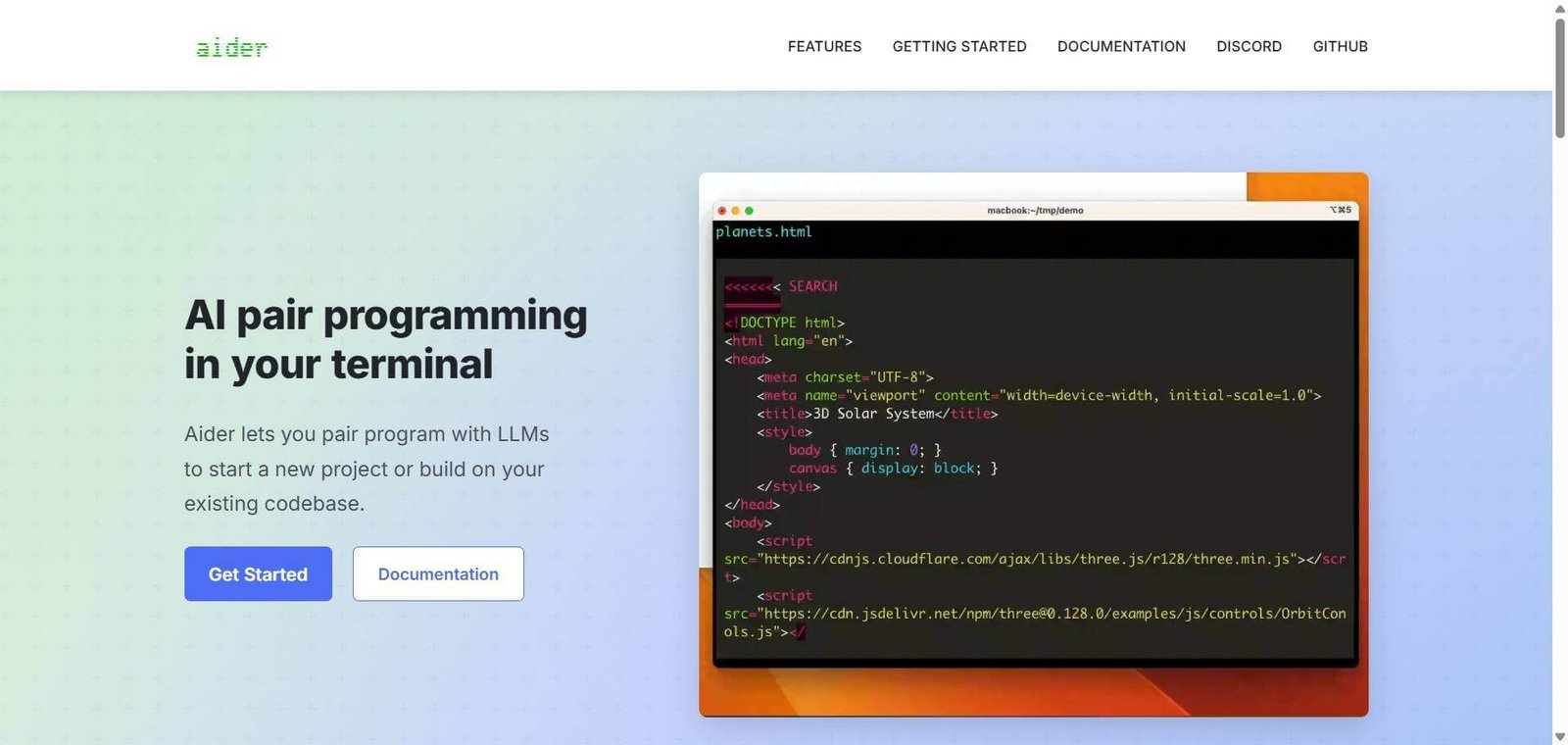
Most AI coding tools make two decisions for you — which model powers the suggestions and where you do your coding. Aider makes neither. Created by Paul Gauthier and released under the Apache 2.0 licence, Aider is a terminal-based AI pair programmer that brings any LLM you choose directly into your local coding environment — Claude Sonnet, GPT-4o, DeepSeek, Gemini, or local models via Ollama — and edits your actual files, in your existing Git repository, committing every change with a generated message. No subscription. No model lock-in. No cloud IDE. Just your terminal, your codebase, and the model you trust most for the task at hand.
Quick Summary
Aider is a free, open-source, terminal-based AI coding assistant that brings any LLM into your local Git repository — editing files directly, committing changes automatically, supporting 100 plus programming languages, building a repository map to understand large codebases, running linters and tests on generated code, and enabling voice coding and image input for vision models — with no platform subscription cost beyond API token usage.
Is it worth using? Yes for terminal-first developers who want full model choice, maximum control over AI coding interactions, and zero vendor lock-in in their AI pair programming workflow. Who should use it? Experienced developers who work primarily in the terminal, want to bring their own API keys and model choices, prefer Git-centric workflows with every AI change committed and reversible, and want to avoid paying platform subscription fees on top of model API costs. Who should avoid it? Developers who prefer a graphical IDE interface with inline autocomplete, visual diff tools, and a polished GUI — Cursor or Windsurf serve this preference significantly better.
Verdict Summary
Best for
Terminal-first developers on Linux and macOS who want AI pair programming without leaving their existing command-line workflow — Aider integrates with the environment they already use rather than replacing it
Developers who want model flexibility — switching between Claude for reasoning-heavy refactoring, GPT-4o for general coding, and DeepSeek for cost-sensitive tasks without switching platforms
Teams doing large codebase refactoring who want Aider’s repository map to maintain context across many files simultaneously — the git-commit-per-change approach makes it easy to review and roll back AI changes at any point
Not for
Developers who want inline autocomplete suggestions as they type — Aider is a chat-based interaction model, not a continuous autocomplete tool
Non-technical users or developers who find command-line tools intimidating — Aider requires comfort with terminal, pip installation, and API key management
Teams whose workflow requires a polished GUI with visual diff review — Cursor’s interface is significantly more accessible for this preference
Rating ⭐⭐⭐⭐ 4.3 / 5
What Is Aider?
Aider is an open-source AI pair programming tool created in 2023 by Paul Gauthier and actively maintained on GitHub under the Apache 2.0 licence. It runs in a terminal alongside a local Git repository — building a map of the repository structure, sending relevant files as context to the chosen LLM, applying edits as diffs directly to the codebase, and committing each successful change with an auto-generated commit message.
The core philosophical difference from IDE-based AI tools is the combination of bring-your-own-key model flexibility and Git-native change management — every AI edit is a discrete, reviewable, reversible Git commit rather than an inline suggestion that the developer accepts or rejects in the moment. This makes Aider’s approach particularly well-suited to significant refactoring work where the ability to review and roll back AI changes in Git history is genuinely valuable.
How Aider Works
Install and configure. Install Aider via pip with pip install aider-chat. Set your API key for the chosen LLM provider — Anthropic, OpenAI, DeepSeek, Google, or a local Ollama endpoint.
Open your project. Navigate to the Git repository in your terminal and run aider. Aider builds a repository map — a structural understanding of the codebase that provides context to the LLM beyond just the files in the current directory.
Add files to context. Tell Aider which files are relevant to the task using /add commands. Aider includes those files in the LLM context for the conversation.
Describe the task. Type a description of what you want to accomplish — a new feature, a bug fix, a refactoring, a test addition. Aider sends the description, repository map, and file contents to the chosen LLM.
Review and approve. Aider proposes code changes as diffs. Review the proposed edits, approve them, and Aider applies the changes to the actual files and commits them to Git with a generated commit message.
Iterate conversationally. Continue the conversation to refine the changes — Aider maintains context across the conversation, allowing iterative improvement without re-specifying the full context each time.
Use architect mode for large tasks. Architect mode uses a more capable model for planning and a faster model for execution — reducing API costs on complex multi-file tasks.
Key Features
Fully free and open-source under Apache 2.0 — no platform subscription cost
Bring-your-own-key model flexibility — Claude, GPT-4o, DeepSeek, Gemini, Llama via Ollama, and 40 plus other models
Repository map providing structural codebase context to the LLM beyond locally open files
Automatic Git commit with generated commit message for every successful AI change
Support for 100 plus programming languages
Architect mode using different models for planning and code execution to reduce API costs
Automatic linter and test runner on generated code — with self-correction capability when tests fail
Voice coding — describe changes by speaking rather than typing
Image input for vision models — attach screenshots, designs, or diagrams as context
Consistently ranks at the top of SWE-bench coding benchmarks for AI coding tools
Real-World Use Cases
Large codebase refactoring: A backend developer needs to refactor authentication across 12 service files — Aider’s repository map provides the LLM with the full structural context, the developer describes the refactoring goal, and Aider applies consistent changes across all 12 files as individual Git commits — each reviewable and reversible independently if any change introduces issues.
Model cost optimisation: A developer uses GPT-4o for routine code additions at $2.50 per million tokens and switches to Claude Opus for complex architectural reasoning at higher cost — Aider’s model flexibility makes this switching seamless without changing the workflow or platform.
Test-driven development: A developer uses Aider to write failing tests first, then asks Aider to write code that passes them — Aider runs the tests after each code generation, iterates automatically when tests fail, and stops when all tests pass. The developer reviews the passing implementation in Git diff form.
Legacy code understanding: A new team member working on a 200,000-line codebase uses Aider’s repository map to ask contextual questions about the codebase structure — understanding how modules connect and where specific logic lives without reading through all the code manually.
Completely free — zero platform subscription cost beyond LLM API tokens
Requires comfort with terminal, pip installation, and API key management
Model flexibility across 40 plus providers with no lock-in
No inline autocomplete — chat-based interaction rather than continuous suggestion
Git-native approach makes every AI change reviewable and reversible
Context management requires deliberate file adding — can burn API credits if context is too broad
Repository map provides large codebase context that file-level tools cannot match
No GUI — less accessible for developers who prefer visual diff review
Top SWE-bench rankings validate coding quality against competing tools
Typical API spend of $10 to $50/month for regular use can exceed some flat-rate subscription alternatives
Pricing & Plans
Aider itself is completely free and open-source. The only cost is LLM API usage:
GPT-4o — approximately $2.50 to $7.50 per million tokens
Claude Sonnet — approximately $3 to $15 per million tokens depending on input versus output
DeepSeek — significantly lower cost for budget-conscious usage
Local models via Ollama — free beyond hardware costs
Most developers report spending $10 to $50 per month on API costs for regular coding work. Large refactoring sessions or monorepo work can increase costs significantly — architect mode reduces this by using cheaper models for execution.
Best Alternatives & Comparisons
Cursor — Better for GUI-based AI coding with inline autocomplete and visual diff at $20/month
Windsurf — Better for accessible AI code editor with strong Cascade agent at $15/month
GitHub Copilot — Better for deep GitHub integration and inline autocomplete in VS Code and JetBrains
Sourcegraph Cody — Better for enterprise multi-repository codebase intelligence and governance
Frequently Asked Questions (FAQ)
What is Aider?
Aider is a free open-source AI pair programming tool that runs in your terminal — editing code directly in your local Git repository using any LLM you choose, committing every change automatically, and building a repository map for large codebase context.
Is Aider free?
Yes — Aider itself is completely free under the Apache 2.0 open-source licence. The only cost is LLM API usage from your chosen provider. Most developers spend $10 to $50 per month on API costs for regular use.
Which AI models does Aider support?
Aider supports 40 plus models including Claude Sonnet and Opus, GPT-4o, DeepSeek, Gemini, Llama via Ollama, and other OpenAI-compatible API endpoints. You provide your own API key for the chosen provider.
How does Aider's repository map work?
Aider analyses the structure of your entire Git repository and builds a map of how files, classes, and functions relate to each other — providing the LLM with broader codebase context than just the files currently open. This helps generate more accurate, contextually appropriate code changes across large codebases.
Does Aider commit changes automatically?
Yes — Aider commits every approved code change to Git with an auto-generated commit message. This makes every AI edit discrete, reviewable in Git history, and reversible with a standard git revert if the change introduces problems.
How does Aider compare to Cursor?
Aider runs in the terminal with bring-your-own-key model flexibility and a Git-centric workflow. Cursor replaces VS Code with a GUI IDE with inline autocomplete, visual diff review, and built-in cloud AI. Aider for terminal-first developers who want model control and zero platform cost. Cursor for developers who want a polished GUI with AI woven into the editor interface.
Final Recommendation
Aider is the most flexible and cost-transparent AI pair programming tool available for terminal-first developers who want to bring their own model choices into their existing local coding workflow. The combination of bring-your-own-key model flexibility, Git-native commit-per-change approach, repository map context, and zero platform cost creates an AI coding tool that rewards developers who value control and transparency over polished GUI convenience. For any experienced developer who has been frustrated by model lock-in, opaque usage costs, or cloud IDEs that change their workflow, Aider provides the terminal-native alternative that puts every decision back in the developer’s hands.