Calendly Review: The Meeting Scheduling Tool That Saves Hours of Email Every Week
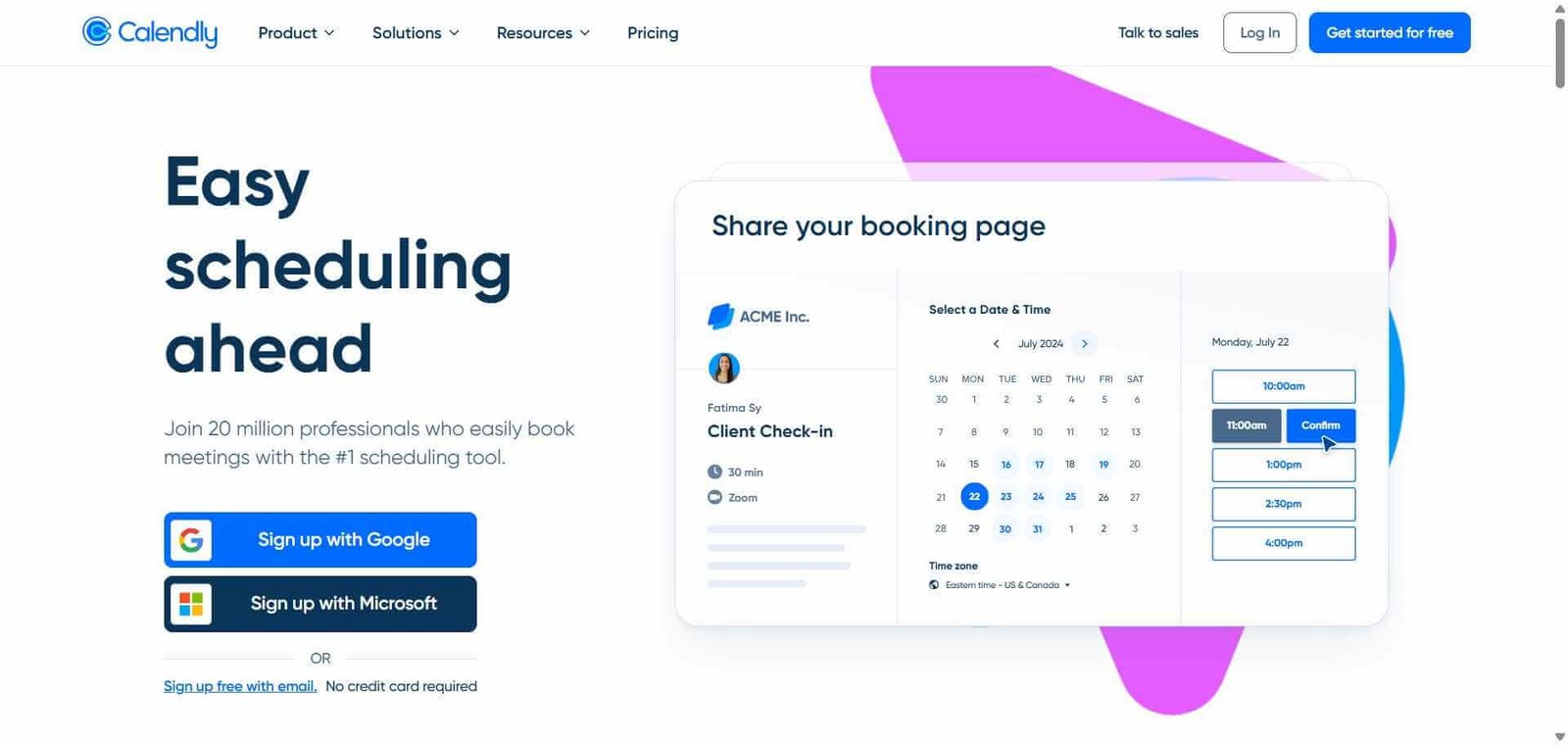
The average professional sends eight emails to schedule a single meeting. Multiplied across every meeting in a week, scheduling consumes a disproportionate amount of time through a process that adds no value to either party. Calendly eliminates this entirely by sharing a link where the other person selects a time that works for them based on your real calendar availability — no back-and-forth, no double-booking, and no time zones to manually calculate. Over 20 million people use it because the problem it solves is universal and its solution is genuinely effortless.
Quick Summary
Calendly is an AI-powered scheduling platform that lets professionals share booking links where others can schedule meetings based on real-time calendar availability, eliminating back-and-forth scheduling emails with automatic confirmation, reminders, and calendar integration.
Is it worth using? Yes for any professional who schedules external meetings regularly and loses time to the back-and-forth email process that Calendly eliminates completely. Who should use it? Sales professionals, consultants, recruiters, customer success managers, coaches, and any professional who regularly schedules meetings with clients, candidates, or external stakeholders. Who should avoid it? People who only schedule internal meetings with teammates where shared calendar access already shows availability.
Verdict Summary
Best for
Sales and business development professionals who schedule discovery calls and demos daily and want a frictionless booking experience for prospects
Recruiters and HR teams managing high-volume interview scheduling across multiple candidates and interviewers simultaneously
Consultants, coaches, and service professionals who want clients to book sessions without email coordination
Not for
Internal meeting scheduling where shared calendar access already shows team availability
Teams whose scheduling needs are limited to internal coordination without external booking requirements
Users who prefer full manual control over every meeting booking
Rating ⭐⭐⭐⭐½ 4.7 / 5
What Is Calendly?
Calendly is a scheduling automation platform that works by connecting to your calendar — Google, Outlook, or Office 365 — reading your real availability in real time, and presenting that availability to whoever you share your booking link with. When they select a time, the meeting is automatically added to both calendars, confirmation emails are sent, and reminder notifications are delivered before the meeting without any manual follow-up.
The platform’s round-robin scheduling distributes incoming meeting requests across a team, its collective scheduling finds times when multiple team members are simultaneously available, and its routing forms qualify and direct incoming booking requests to the right team member based on their answers — features that make Calendly genuinely valuable for sales and recruiting teams beyond individual use.
How Calendly Works
Connect your calendar. Link your Google Calendar, Outlook, or Office 365 account. Calendly reads your real availability without exposing your calendar details to booking guests.
Create event types. Define the types of meetings you offer — a 30-minute discovery call, a 60-minute strategy session, a 15-minute quick check-in — with different durations, locations, and booking rules for each.
Set your availability preferences. Define which hours you accept meetings, minimum notice requirements, buffer time between meetings, and maximum daily meeting limits to protect your schedule.
Share your booking link. Send your Calendly link in emails, add it to your email signature, embed it on your website, or share it on social media — anyone can book a time without any back-and-forth.
Let guests book themselves. Your guest selects an available time from your real-time calendar, fills in any custom questions you have set, and receives automatic confirmation and reminder emails.
Review and manage bookings. See all upcoming bookings in your Calendly dashboard, with automatic calendar sync ensuring your availability stays accurate as new bookings are made.
Key Features
Booking link with real-time calendar availability sync
Multiple event types with different durations, locations, and questions
Round-robin scheduling distributing bookings across team members
Collective scheduling finding availability across multiple calendars simultaneously
Routing forms qualifying and directing booking requests to the right team member
Automatic confirmation and reminder emails to both parties
Integration with Zoom, Google Meet, Microsoft Teams for video call creation
Payments through Stripe for charging for bookings
Analytics showing booking volume, conversion rates, and popular times
Real-World Use Cases
Sales discovery call booking: A sales representative adds their Calendly link to every outbound email, allowing interested prospects to book a discovery call immediately without a follow-up email exchange.
Recruiting interview scheduling: An HR team uses round-robin scheduling to distribute interview bookings across recruiters, with collective scheduling finding times when both the recruiter and hiring manager are available simultaneously.
Consultant session booking: A consultant adds Calendly to their website, allowing new clients to book an initial consultation and pay the session fee in a single step using Stripe integration.
Customer success check-ins: A customer success team embeds a Calendly form in onboarding emails, allowing new customers to book their setup call at a time convenient to them without waiting for a manual outreach.
Works for any meeting type with customisable booking rules
Some guests prefer email scheduling over booking links
Automatic reminders reduce no-shows without manual follow-up
Advanced routing and qualification features on higher tiers
Payment collection through Stripe adds monetisation capability
Interface has more options than casual users need
Pricing & Plans
Free — $0/month
1 active event type
Unlimited meetings
Google and Outlook calendar sync
Automated email notifications
Standard — $10/user/month
Unlimited event types
Group events
Custom branding
Integrations with Zoom, Salesforce, and others
Payments via Stripe
Teams — $16/user/month
All Standard features
Round-robin routing
Collective scheduling
Team reporting and analytics
Enterprise — Custom pricing
All Teams features
SSO and advanced security
Custom admin controls
Dedicated support
Best Alternatives & Comparisons
Reclaim AI — Better for intelligent calendar management and focus time protection, Calendly handles external booking
Cal.com — Open-source alternative with similar features at lower cost, smaller integration ecosystem
Tldv — Better for recording and sharing meeting moments after they happen, not a scheduling tool
Superhuman — Better for email processing speed, different workflow focus
Frequently Asked Questions (FAQ)
What is Calendly?
Calendly is an AI-powered scheduling platform that lets professionals share booking links where others can schedule meetings based on real-time calendar availability, eliminating back-and-forth scheduling emails.
Is Calendly free?
Yes, Calendly offers a free plan with one active event type and unlimited meetings. Paid plans start at $10/user/month with unlimited event types and integrations.
How does Calendly prevent double-booking?
Calendly reads your live calendar in real time, so available booking slots reflect your actual current availability including any meetings already scheduled. When a booking is confirmed, it is immediately added to your calendar, removing that slot from future availability.
Can Calendly take payments for bookings?
Yes, Calendly integrates with Stripe on the Standard plan and above, allowing you to charge for consultations, coaching sessions, or any bookable service directly through the booking flow.
How does round-robin scheduling work in Calendly?
Round-robin scheduling automatically distributes incoming booking requests across multiple team members in rotation, ensuring meeting load is shared evenly without manual assignment.
Does Calendly work with Zoom?
Yes, Calendly integrates with Zoom, Google Meet, and Microsoft Teams to automatically create video call links for each booked meeting and include them in confirmation emails to both parties.
Final Recommendation
Calendly is one of the highest-ROI productivity tools available for any professional who schedules external meetings regularly. The time saved on scheduling back-and-forth emails is immediate and significant, and the automatic reminders reduce no-shows without any manual effort. The free plan covers individual use cases thoroughly, and the Standard plan at $10/month adds the unlimited event types and integrations that make Calendly genuinely complete for professional use.