ClickUp Review: The Project Management Platform That Keeps Adding AI Until Nothing Is Manual
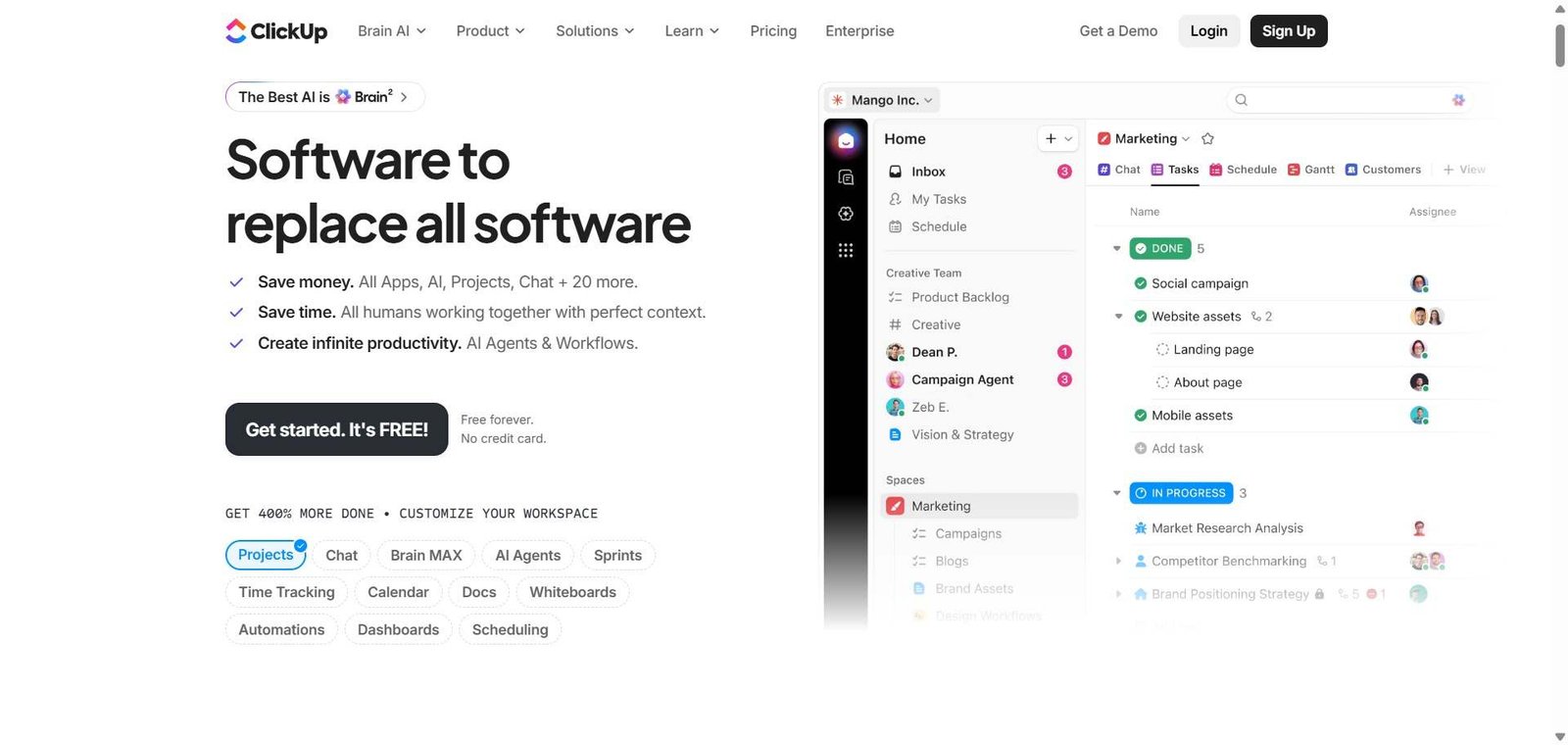
Project management tools have a consolidation problem — teams end up paying for Jira for tasks, Notion for docs, Slack for communication, and another tool for goals, switching between all four constantly. ClickUp was built to end this fragmentation by putting tasks, documents, goals, whiteboards, and time tracking in one platform — and ClickUp Brain, its AI layer, now handles the part no tool could automate before: writing task descriptions, summarising threads, generating project plans, answering questions about your workspace, and creating tasks from spoken or written instructions. For teams who want a single platform with genuine AI reducing manual overhead, ClickUp is the most complete option available at its price point.
Quick Summary
ClickUp is an AI-powered all-in-one project management platform combining tasks, docs, goals, whiteboards, time tracking, and automation — with ClickUp Brain providing AI writing assistance, task creation from natural language, workspace Q&A, and automated standup summaries.
Is it worth using? Yes for teams who want to consolidate their project management, documentation, and goal tracking into one platform with AI reducing the manual overhead of maintaining project data. Who should use it? Teams of all sizes — from startups to enterprises — who want to consolidate multiple work tools into one platform with AI assistance across every feature area. Who should avoid it? Teams who want the most opinionated, minimal project management experience where Linear’s focused simplicity is a better fit, or those who find ClickUp’s feature breadth overwhelming.
Verdict Summary
Best for
Teams currently paying for Jira, Notion, and a goal-tracking tool separately who want to consolidate into one platform without sacrificing capability in any area
Project managers who want AI to handle the administrative layer — writing task descriptions, summarising updates, generating project plans — so they can focus on decisions and communication
Growing companies who want one platform that scales from small team task management to enterprise project tracking without migrating tools
Not for
Engineering teams who want the most focused, minimal issue tracking experience where Linear’s speed and simplicity are non-negotiable
Teams for whom feature breadth creates confusion rather than capability — ClickUp’s comprehensiveness requires intentional setup to be effective
Organisations whose workflows are simple enough that a free Trello board or Notion page adequately covers their needs
Rating ⭐⭐⭐⭐ 4.4 / 5
What Is ClickUp?
ClickUp is a project management and productivity platform that positions itself as the replacement for multiple work tools — combining tasks with multiple views (list, board, calendar, gantt, timeline, mind map), documents with collaborative editing, goals with progress tracking, whiteboards for visual brainstorming, time tracking, and over 1,000 integrations in one platform.
ClickUp Brain, launched as its AI layer, extends this with contextual intelligence across the workspace — answering questions about any task, document, or project in natural language, generating task descriptions and subtasks from brief instructions, summarising comment threads and project updates, creating weekly standup reports automatically, and building project plans from scratch when given a project description.
How ClickUp Works
Structure your workspace. Create Spaces for each team or department, Folders for projects, and Lists for task collections — building a hierarchy that matches your organisation’s structure.
Create and manage tasks. Add tasks with descriptions, assignees, due dates, priorities, custom fields, and dependencies. Switch between list, board, calendar, gantt, and other views for the same tasks.
Use ClickUp Brain throughout. In any task, document, or comment thread, invoke ClickUp Brain to write descriptions, summarise updates, answer questions about the project, generate subtasks, or create a project plan from a brief description.
Create documents. Build team wikis, project briefs, meeting notes, and SOP documents in ClickUp Docs — connected to relevant tasks and projects in the same workspace.
Set and track goals. Define OKRs and goals linked to specific tasks and lists — with automatic progress tracking as underlying tasks are completed.
Automate repetitive workflows. Create no-code automations that trigger task status changes, assignments, notifications, and other actions based on defined conditions — eliminating manual workflow management.
Key Features
Tasks with 15 plus views — list, board, calendar, gantt, timeline, mind map, and more
ClickUp Brain for AI writing, task generation, workspace Q&A, and project planning
Docs for collaborative documentation connected to tasks and projects
Goals and OKR tracking with automatic progress from linked tasks
Whiteboards for visual brainstorming and mind mapping
Time tracking built into tasks without a separate tool
1,000 plus integrations with external tools
No-code automation builder for workflow automation
Custom fields for adapting task structure to any workflow
Real-World Use Cases
Tool consolidation: A marketing team replaces Asana (tasks), Notion (docs), and a separate goal tracker with ClickUp — managing campaigns in tasks, writing briefs in Docs, tracking quarterly OKRs in Goals, and using ClickUp Brain to generate campaign task breakdowns from brief descriptions.
AI standup generation: A remote engineering team uses ClickUp Brain to automatically generate a weekly standup summary every Monday morning — pulling the status of all tasks updated in the past week and summarising progress, blockers, and upcoming work without anyone writing the update manually.
Project planning with AI: A project manager describes a new software implementation project to ClickUp Brain and receives a complete project plan with phases, tasks, dependencies, and suggested timelines — editing and assigning rather than building from scratch.
Client project management: An agency manages all client projects in ClickUp — with separate Spaces per client, Docs for briefs and reports, and automated status notifications when task milestones are reached.
Most complete feature set in the project management category for the price
Feature breadth requires intentional setup investment to avoid overwhelming complexity
ClickUp Brain reduces administrative overhead across every feature area
Interface can feel cluttered compared to focused alternatives like Linear
Generous free plan covers small teams comprehensively
Occasional performance issues on very large workspaces reported by users
15 plus task views cover every team’s preferred way of visualising work
Learning curve is steeper than single-purpose tools
Goals and OKR tracking alongside tasks removes a separate tool
ClickUp Brain requires paid plan — not available on free tier
Pricing & Plans
Free — $0/month
Unlimited tasks and members
100 MB storage
Core views (list, board, calendar)
Basic automation
Community support
Unlimited — $7/user/month
Unlimited storage
All views
Unlimited integrations
Goal tracking
Time tracking
Business — $12/user/month
All Unlimited features
ClickUp Brain (AI)
Advanced automation
Advanced reporting
Custom exports
Enterprise — Custom pricing
All Business features
SSO
Advanced security
Custom contracts
Dedicated support
Best Alternatives & Comparisons
Linear — Better for engineering teams who want the most focused and fast issue tracking without ClickUp’s feature breadth
Asana AI — Better for structured cross-functional project management with a cleaner interface, less feature breadth
Monday AI — Better for visual workflow management with strong automation, different interface approach
Notion AI — Better for document-centric teams where the database is the primary work surface, less task management depth
Frequently Asked Questions (FAQ)
What is ClickUp?
ClickUp is an AI-powered all-in-one project management platform combining tasks, docs, goals, whiteboards, time tracking, and automation with ClickUp Brain for AI writing, task generation, and workspace intelligence.
Is ClickUp free?
Yes, ClickUp offers a free plan with unlimited tasks and members, core views, and basic automation. ClickUp Brain (AI) is available on the Business plan at $12/user/month.
What is ClickUp Brain?
ClickUp Brain is ClickUp’s AI layer that answers questions about any workspace content in natural language, generates task descriptions and subtasks from brief instructions, summarises comment threads and project updates, creates automated standup reports, and builds project plans from descriptions.
How many views does ClickUp support?
ClickUp supports over 15 task views including list, board, calendar, gantt, timeline, mind map, table, activity, workload, and others — all presenting the same underlying task data in different formats for different purposes.
Does ClickUp replace Notion?
ClickUp Docs provides collaborative document editing connected to tasks and projects, covering many of Notion’s use cases. However, Notion’s database and knowledge management flexibility remains deeper for document-centric teams. Many teams use ClickUp for project management while retaining Notion for their knowledge base.
How does ClickUp compare to Asana?
ClickUp offers more features — more views, built-in docs, goals, whiteboards, and time tracking — at lower pricing. Asana has a cleaner, more focused interface and stronger cross-functional project template ecosystem. ClickUp is better for teams who want maximum capability in one tool; Asana for those who prioritise interface clarity and structure.
Final Recommendation
ClickUp is the most comprehensive project management platform available at its price point — and ClickUp Brain’s AI layer genuinely reduces the administrative overhead that makes project management tools burdensome to maintain. For teams currently managing work across multiple separate tools, the consolidation value alone often justifies the switch. The free plan covers small teams completely, and the Business plan at $12/user/month provides ClickUp Brain alongside the full feature set for teams who want AI embedded throughout their project management workflow.