Payload CMS Review: The Headless CMS That Developers Build on Rather Than Around
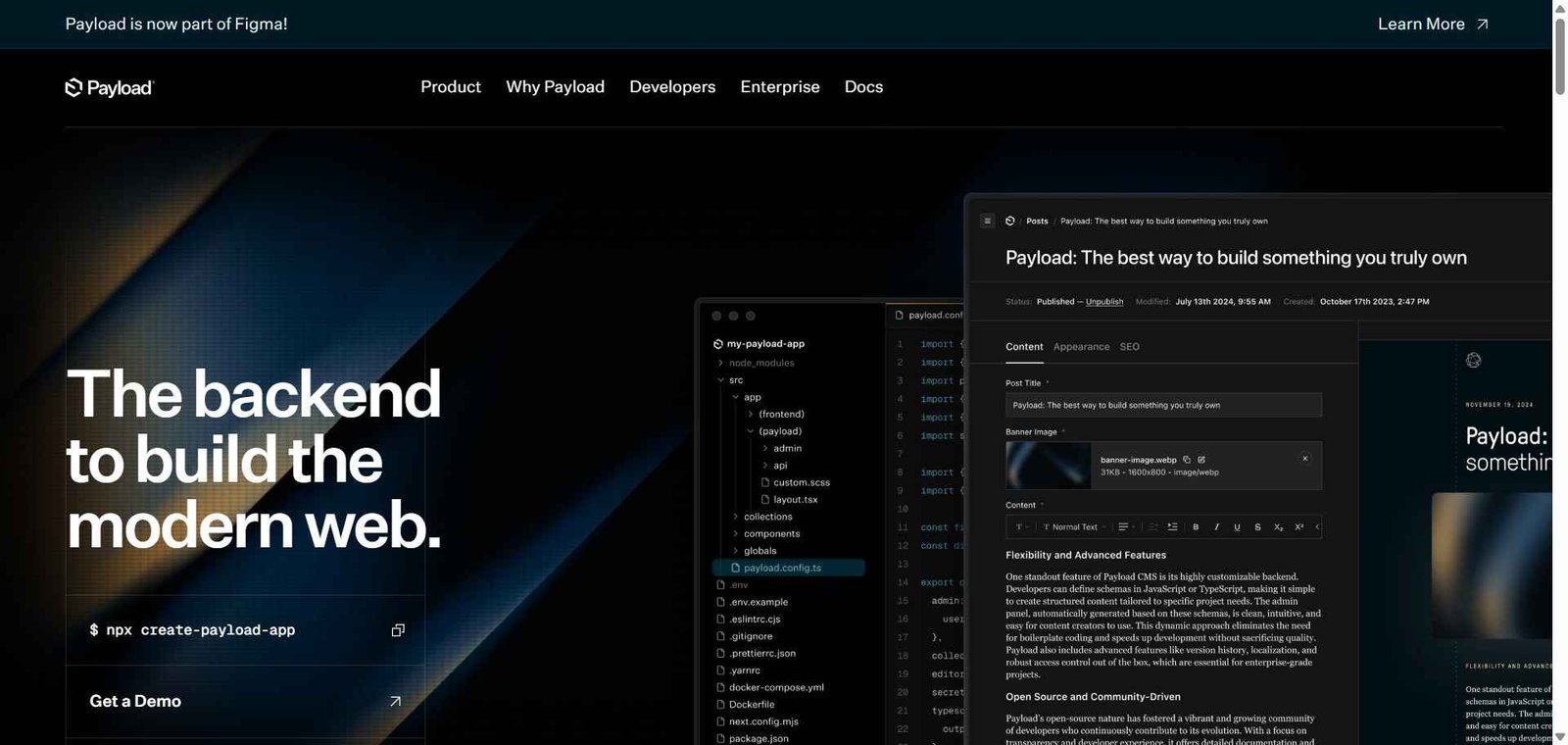
Every CMS makes assumptions that eventually become constraints. Payload CMS starts from a different premise — the developer defines the entire CMS in TypeScript code, including collections, fields, access control, hooks, and admin UI customizations, and Payload generates a fully functional admin panel and REST/GraphQL API from that definition. The result is a headless CMS that feels genuinely owned by the developer rather than borrowed from a platform, with no arbitrary feature limits and complete freedom to extend any aspect of the system.
Quick Summary
Payload CMS is an open-source TypeScript-first headless CMS where developers define collections, fields, and access control in code — with a generated admin panel, REST and GraphQL APIs, AI content generation, and full self-hosting capability.
Is it worth using? Yes for TypeScript and Next.js developers who want a headless CMS they define completely in code with no vendor constraints, self-hosting capability, and AI content generation. Who should use it? TypeScript developers, Next.js developers, and engineering teams who want a headless CMS that feels like part of their application rather than a third-party platform — with complete control over schema, access, and admin UI. Who should avoid it? Non-technical content teams who need a CMS configured through a UI without developer involvement, or organisations that need a fully managed cloud CMS without self-hosting.
Verdict Summary
Best for
TypeScript and Next.js developers who want a headless CMS defined entirely in code with the same language and patterns as their application
Agencies building client websites who want a self-hosted CMS without ongoing per-project SaaS fees
Development teams with specific access control, workflow, or admin UI requirements that hosted CMS platforms cannot accommodate
Not for
Non-technical content teams who need to configure the CMS without developer involvement
Teams who need a fully managed cloud CMS without server management overhead
Projects where a hosted solution like Sanity or Contentful removes the infrastructure burden that Payload’s self-hosting requires
Rating ⭐⭐⭐⭐ 4.4 / 5
What Is Payload CMS?
Payload CMS is an open-source headless content management system built with Node.js and TypeScript that takes a code-first approach — developers define their content model in TypeScript config files, and Payload generates a fully functional admin panel, REST API, and GraphQL API from those definitions. Everything is configurable in code — collections (content types), fields (data types), access control (who can read/write what), hooks (lifecycle events), and admin UI components — giving developers complete control without a visual schema builder that constrains what is possible.
The AI features include an AI generation plugin that adds content generation capabilities to any rich text field in the admin panel — editors can generate, expand, or rewrite content using AI directly within their content management workflow.
How Payload CMS Works
Define your schema in TypeScript. Create Payload collections and globals in TypeScript config files — defining fields, field types, validation rules, access control, and admin UI settings for each content type.
Run the admin panel. Start the Payload server and access the generated admin panel — a fully functional CMS UI built from your schema definition without any additional configuration.
Create and manage content. Content editors use the admin panel to create, update, and manage content entries in each collection — with a UI precisely matched to the schema you defined.
Use AI for content generation. Enable the AI plugin and content editors can generate, expand, or rewrite rich text content using AI directly within the editor — with AI accessing the content type context for relevant generation.
Access through APIs. Fetch content in your frontend application through Payload’s REST API or GraphQL endpoint — with full TypeScript types generated from your schema for type-safe content fetching.
Self-host on any infrastructure. Deploy Payload on any Node.js hosting — a VPS, Railway, Render, or any cloud provider — with your database of choice (PostgreSQL, MongoDB).
Key Features
TypeScript-first code-defined schema — collections, fields, access control, and hooks
Auto-generated admin panel matching the defined schema exactly
REST API and GraphQL API generated from the schema definition
AI content generation plugin for rich text fields in the admin panel
Versioning and drafts for content workflow management
Access control at collection, document, and field level
Hooks for lifecycle events — beforeCreate, afterUpdate, etc.
Custom admin UI components using React
Self-hosting on any Node.js infrastructure with PostgreSQL or MongoDB
Real-World Use Cases
Agency website CMS: An agency builds client websites with Payload CMS self-hosted on each client’s server — the developer defines the exact content model the client needs, clients manage content through the generated admin panel, and no ongoing SaaS fee applies to each project.
Next.js application CMS: A Next.js application uses Payload CMS on the same server — sharing authentication, database, and TypeScript types between the application and CMS, with content fetched through Payload’s REST API using the same type definitions.
Custom workflow CMS: A media company requires a specific editorial approval workflow that no hosted CMS accommodates — they implement the exact workflow in Payload’s hooks and access control, getting precisely what they need without platform constraints.
AI-assisted editorial workflow: Content editors use Payload’s AI plugin to generate initial article drafts, expand bullet outlines into full sections, and rewrite content for different audience tones — all within the Payload admin panel without switching to external AI tools.
Sanity — Better for teams wanting a hosted CMS with a real-time collaborative Studio and GROQ, less developer control
Contentful — Better for enterprise teams with non-technical editors and managed infrastructure, higher cost
Storyblok — Better for visual component-based editing with headless delivery, less developer code control
Directus — Similar open-source headless CMS with self-hosting, different schema-from-database approach
Frequently Asked Questions (FAQ)
What is Payload CMS?
Payload CMS is an open-source TypeScript-first headless CMS where developers define collections, fields, and access control in code — with a generated admin panel, REST and GraphQL APIs, AI content generation, and full self-hosting capability.
Is Payload CMS free?
Yes, Payload CMS is completely free and open-source for self-hosting. Payload Cloud managed hosting starts at $25/month per project.
Why is Payload CMS TypeScript-first?
Payload defines the schema in TypeScript and generates TypeScript types from that definition — enabling type-safe content fetching in TypeScript applications where the IDE knows exactly what properties each content type has. This is particularly valuable for Next.js and other TypeScript-based frontend frameworks.
Does Payload CMS require self-hosting?
The open-source version requires self-hosting on any Node.js infrastructure. Payload Cloud provides managed hosting as a paid alternative for teams who want to avoid infrastructure management.
What AI features does Payload CMS have?
Payload’s AI plugin adds AI content generation to rich text fields in the admin panel — content editors can generate, expand, or rewrite content using AI directly within their content management workflow without switching to external AI tools.
How does Payload CMS compare to Sanity?
Payload defines the schema in TypeScript code with complete developer control. Sanity defines the schema in JavaScript with a visual Studio generated from it. Payload is better for developers who want maximum code-level control and self-hosting. Sanity is better for teams who want a hosted real-time collaborative CMS with a stronger editorial experience.
Final Recommendation
Payload CMS is the right headless CMS for TypeScript developers who have felt constrained by what hosted CMSs allow them to define, configure, and control. The code-first schema definition, generated TypeScript types, self-hosting capability, and zero vendor lock-in create a CMS that genuinely feels like part of the application rather than a third-party service grafted onto it. For agencies and development teams building multiple projects, the self-hosted open-source model eliminates per-project SaaS costs while providing complete flexibility for each project’s specific requirements.